The Shipment API uses OAuth 2.0 with the client credentials flow.
You create a Client ID and Client Secret in Shipment, exchange them for an access token and send that token with every request.
This applies to all modules, including Chamber of Commerce.
The tokens are issued by Keycloak, an open-source identity provider.
Which authentication do you need?
| Module | Authentication | Article |
| Customs, customs warehouse, transit, excise, transport documents, NVWA, Portbase and Single Window | OAuth 2.0 with a Client ID and Client Secret | This article |
| Chamber of Commerce | OAuth 2.0 with a Client ID and Client Secret (recommended), or Basic authentication with the username and password of a Shipment user | This article for OAuth 2.0; Authentication (Chamber of Commerce) for Basic authentication |
| Webhook (status updates to your platform) | Shipment calls your endpoint, with no authentication, Basic authentication or OAuth | Status updates |
Overview
| Item | Value |
| Method | OAuth 2.0, client credentials |
| Identity provider | Keycloak. For more information, see the Keycloak documentation. |
| Scope | erpservice |
| Token lifetime | 1 hour |
| Transport | HTTPS, TLS 1.3 or higher |
| Header | Authorization: Bearer <access_token> |
Create a Client ID and Client Secret
You create the credentials in an ERP integration (ERP koppeling) in Stratech Shipment or Beurtvaartadres ShipmentManager.
The screen labels below are the Dutch labels as shown in the application, with a translation.
Step 1: Open the settings
Log in with a user account of the type Administrator.
The account created during activation is an Administrator by default.
You'll find the URL in your activation email.
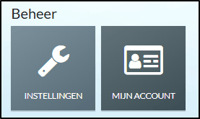
Click Beheer > Instellingen (Management > Settings).
Step 2: Open the ERP integrations
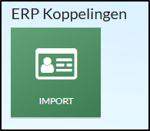
Click ERP Koppelingen > Import (ERP integrations > Import).
Step 3: Create an ERP integration
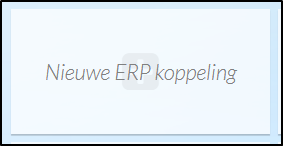
Click Nieuwe ERP koppeling (New ERP integration).
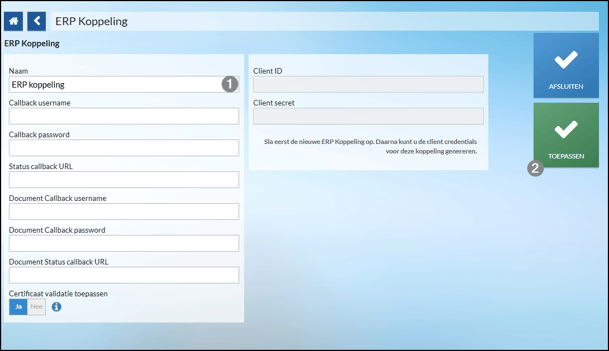
Enter a name for the integration and click Toepassen (Apply).
Step 4: Generate the credentials
The Genereer (Generate) button is now available.
Click it to generate the Client ID and Client Secret.
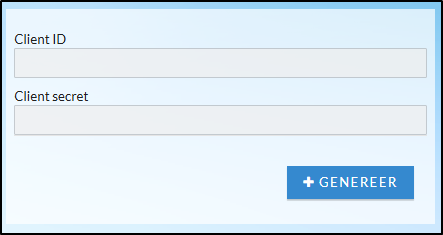
A message says that the Client Secret is shown only once and that you must also update the new credentials in your platform.
Click OK.
Step 5: Store the Client ID and Client Secret
Copy the Client ID and Client Secret from this screen and store them securely.
You cannot view them again later.
Then click Afsluiten (Close).
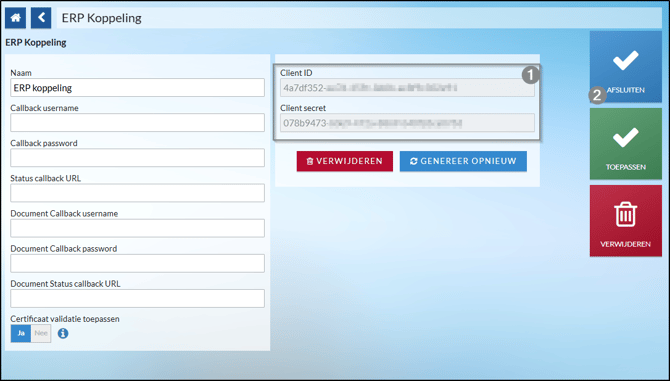
Warning: lost the Client Secret? Click Genereer opnieuw (Generate again) to create a new combination.
The old Client Secret then stops working, so update the new credentials in your platform as well.
Credentials belong to one environment.
Test and Production each need their own Client ID and Client Secret.
Request a token
Send a POST request with Content-Type: application/x-www-form-urlencoded to the token endpoint of your environment.
https://{host}/realms/{realm}/protocol/openid-connect/token
Replace {host} and {realm} with the values of your product and environment:
| Product and environment | {host} | {realm} |
| Stratech Shipment – Test | training-kc.stratech.nl |
stratech |
| Stratech Shipment – Production | prod-kc.stratech.nl |
stratech |
| Beurtvaartadres ShipmentManager – Test | bva-acc-kc.stratechlive.nl |
bva |
| Beurtvaartadres ShipmentManager – Production | bva-prod-kc.beurtvaartadres.nl |
bva |
Parameters:
| Parameter | Value |
grant_type |
client_credentials |
client_id |
Your Client ID |
client_secret |
Your Client Secret |
scope |
erpservice |
Example request (Test):
curl -X POST "{token-endpoint}" \
  -H "Content-Type: application/x-www-form-urlencoded" \
  -d "grant_type=client_credentials" \
  -d "client_id=YOUR_CLIENT_ID" \
  -d "client_secret=YOUR_CLIENT_SECRET" \
  -d "scope=erpservice"
Replace {token-endpoint} with the token endpoint of your product and environment, as shown above.
Example response:
{
  "access_token": "eyJhbGciOi...",
  "expires_in": 3600,
  "token_type": "Bearer",
  "scope": "erpservice"
}
Token response
The token response is JSON and follows the OAuth 2.0 standard (RFC 6749, section 5.1).
| Field | Required by OAuth 2.0 | Description |
access_token |
Yes | The token you send with every request. |
token_type |
Yes | Always Bearer. |
expires_in |
No | Lifetime of the token in seconds. |
refresh_token |
No | Token to request a new access token. |
scope |
No | The scope of the token. |
Keycloak also sends extra fields that are not part of RFC 6749, for example refresh_expires_in, not-before-policy and session_state. These extensions are allowed by the standard, which says: "The client MUST ignore unrecognized value names in the response."
Important: don't validate the token response against a fixed schema with only the fields above.
Read the fields you need and ignore the rest.
A fixed schema (for example an XSD) gives errors such asunexpected content "refresh_expires_in"; expected "scope". Keycloak can add fields in a new version.
Use the token
Send the token in the Authorization header of every API request:
Authorization: Bearer eyJhbGciOi...
A token is valid for 1 hour.
We recommend requesting a new token for every call.
That way your integration never fails on an expired token.
Legacy token endpoints
These are the previous token endpoints.
They still work for now.
| Product and environment | Legacy token endpoint |
| Stratech Shipment – Test | https://shptrainingidentity.stratech.nl/connect/token |
| Stratech Shipment – Production | https://identity.stratech.nl/connect/token |
| Beurtvaartadres ShipmentManager – Test | https://identity.stratechlive.nl/connect/token |
| Beurtvaartadres ShipmentManager – Production | https://identity.beurtvaartadres.nl/connect/token |
Important: the legacy token endpoints will be switched off in the near future.
We will inform you well in advance of the exact date.
Does your integration still use one of these endpoints? Switch to the new token endpoint of the same product and environment now, as described in Request a token above.
Your Client ID and Client Secret stay the same. [VERIFY]
Authentication for status updates
Status updates work the other way around: Shipment calls your endpoint.
Those calls use no authentication, Basic authentication or OAuth, as set in the ERP integration; not the Bearer token described in this article.
See the article Status updates.