A Certificate of Origin (COO, in Dutch: Certificaat van Oorsprong) is issued by the Chamber of Commerce (KvK). With the API you create the request in Shipment; a user completes and submits it to the Chamber of Commerce. This article follows the screens of the request in Shipment. For each screen you see which JSON field fills which field.
The Chamber of Commerce module has its own endpoint, its own message structure (Header and Body, PascalCase) and only supports Basic authentication. The general rules for this module, the Header fields and the response are in the article Chamber of Commerce.
Downloads
Endpoint
POST {base-url}/api/Import/ImportDossier, with Authorization: Basic <base64(username:password)>.
Replace {base-url} with the URL of your product and environment:
| Product and environment | {base-url} |
| Stratech Shipment – Test | https://test-{prefix}.shipment-stratech.nl |
| Stratech Shipment – Production | https://{prefix}.stratechshipment.nl |
| Beurtvaartadres ShipmentManager – Test | https://{prefix}.accshipmentmanager.eu |
| Beurtvaartadres ShipmentManager – Production | https://{prefix}.shipmentmanager.eu |
Structure
The request has a Header with the dossier reference ShipmentIdentifier and a Body. The object Body.ChamberOfCommerce.COO makes the request a Certificate of Origin. Consignor and consignee are in Body.Parties[], with PartnerRole 0 (consignor) or 2 (consignee).
How to read the tables
The column Req. shows what the API requires: ✓ means the request is rejected without the field. Which fields the Chamber of Commerce requires on the certificate is checked when the request is validated in Shipment.
Dossier overview
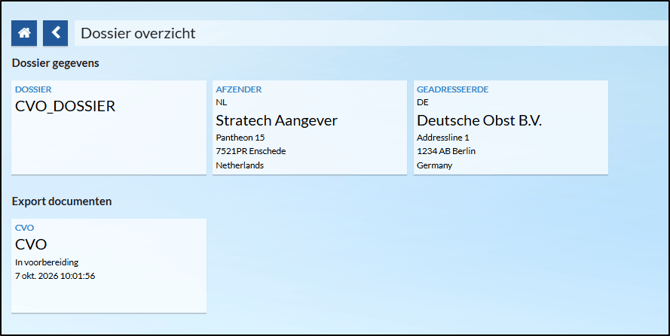
| Field in Shipment | JSON field | Type | Req. | Description |
| Dossier gegevens > Dossier | Header.ShipmentIdentifier |
string(30) |
✓ | Your reference for the dossier. No spaces at the start or end. |
| Dossier gegevens > Afzender | Body.Parties[] |
array |
Consignor: the item with PartnerRole 0. See step 1. |
|
| Dossier gegevens > Geadresseerde | Body.Parties[] |
array |
Consignee: the item with PartnerRole 2. See step 2. |
|
| Export documenten > CVO | Body.ChamberOfCommerce.COO |
object |
Shown when the request contains a Certificate of Origin. |
Step 1: Afzender (Consignor)
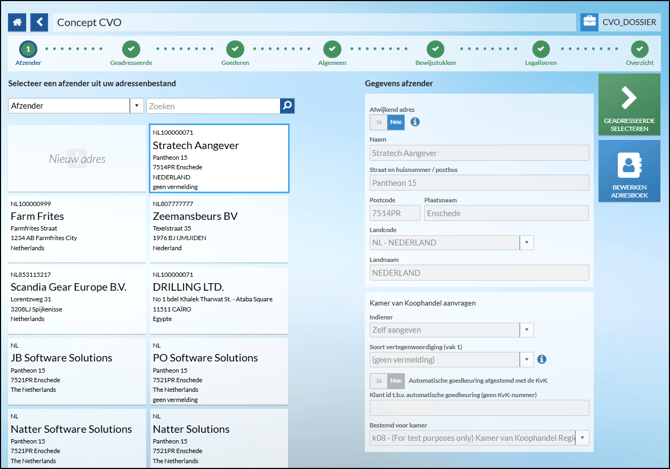
Path: Body.Parties[]
| Field in Shipment | JSON field | Type | Req. | Description |
| Afzender > Rol | PartnerRole |
integer |
0 = consignor. Always send it. |
|
| Afzender > Interne code | InternalCode |
string |
Internal code of the address in the address book. Shipment then takes the name and address from the address book. | |
| Afzender > Naam | Name |
string(150) |
Name. | |
| Afzender > Adresregels | Address.Lines |
array of string |
Address lines, for example street and house number. | |
| Afzender > Postcode | Address.PostcodeID |
string(10) |
Postal code. | |
| Afzender > Plaatsnaam | Address.CityName |
string(30) |
City. | |
| Afzender > Landcode | Address.CountryCode |
string(2) |
Country code (ISO 3166-1, 2 letters). | |
| Afzender > Landnaam | Address.CountryName |
string(46) |
Country name. | |
| – | Identifiers[].Value |
string |
Identification number of the party. | |
| – | Identifiers[].IdentType |
integer |
Type of the number: 0 = customer ID, 1 = EORI number. |
The field Interne code is not on the screen. How the link with the address book works is in the article Customs, section Link to the address book (internalCode).
Step 2: Geadresseerde (Consignee)
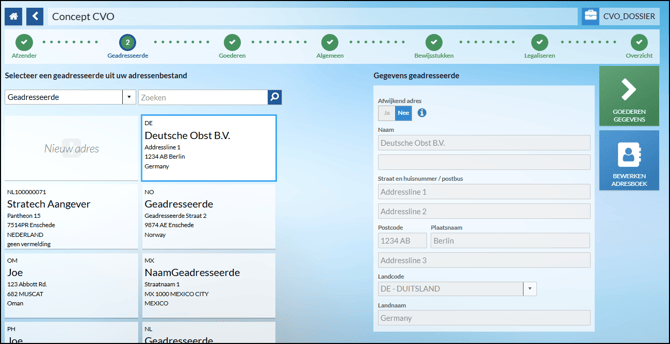
Path: Body.Parties[]
| Field in Shipment | JSON field | Type | Req. | Description |
| Geadresseerde > Rol | PartnerRole |
integer |
2 = consignee. Always send it. |
|
| Geadresseerde > Interne code | InternalCode |
string |
Internal code of the address in the address book. Shipment then takes the name and address from the address book. | |
| Geadresseerde > Naam | Name |
string(150) |
Name. | |
| Geadresseerde > Adresregels | Address.Lines |
array of string |
Address lines, for example street and house number. | |
| Geadresseerde > Postcode | Address.PostcodeID |
string(10) |
Postal code. | |
| Geadresseerde > Plaatsnaam | Address.CityName |
string(30) |
City. | |
| Geadresseerde > Landcode | Address.CountryCode |
string(2) |
Country code (ISO 3166-1, 2 letters). | |
| Geadresseerde > Landnaam | Address.CountryName |
string(46) |
Country name. | |
| – | Identifiers[].Value |
string |
Identification number of the party. | |
| – | Identifiers[].IdentType |
integer |
Type of the number: 0 = customer ID, 1 = EORI number. |
|
| Geadresseerde > Afwijkend adres | – | No JSON field. Only in Shipment. |
The screen shows the address lines as Straat en huisnummer / postbus and Adresregel 3: these are the items of Address.Lines.
Step 3: Goederen (Goods)
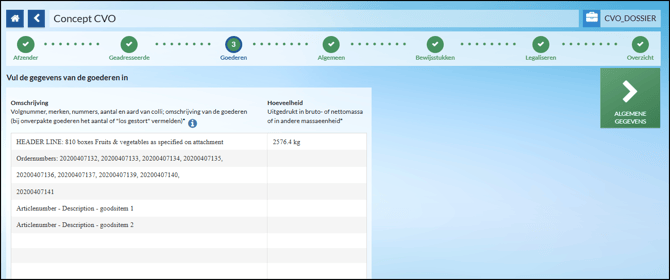
Path: Body.ChamberOfCommerce.COO.CooGoodsItems[]
| Field in Shipment | JSON field | Type | Req. | Description |
| Goederen > Omschrijving | Description |
string(71) |
Description of the goods, printed on the certificate. | |
| Goederen > Hoeveelheid | Quantity |
string(23) |
Quantity or weight, printed on the certificate. |
The certificate has room for 26 goods lines at most.
Step 4: Algemeen (General)
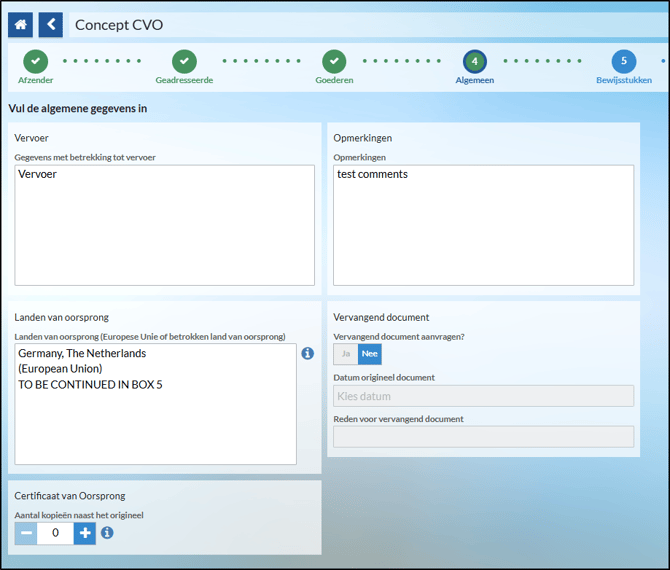
Vervoer en opmerkingen
Path: Body
| Field in Shipment | JSON field | Type | Req. | Description |
| Vervoer > Gegevens met betrekking tot vervoer | ChamberOfCommerce.TransportInformation |
array of string |
Transport details, one item per line. | |
| Opmerkingen > Opmerkingen | ShipmentInstructions.ShipmentComments.Text |
string(322) |
Remarks printed on the certificate. | |
| Opmerkingen > Type | ShipmentInstructions.ShipmentComments.CommentType |
integer |
0 = Certificate of Origin, 1 = EUR.1 / EUR-MED. Use 0. |
Certificaat van Oorsprong
Path: Body.ChamberOfCommerce.COO
| Field in Shipment | JSON field | Type | Req. | Description |
| Landen van oorsprong > Land van oorsprong | CountriesOfOrigin |
array of string |
Countries of origin, printed on the certificate. One item per line. | |
| Vervangend document > Datum origineel document | Statement1No.OriginalDate |
date-time |
✓ * | Date of the original certificate. * Required when you send Statement1No. |
| Vervangend document > Reden voor vervangend document | Statement1No.ReplacementReason |
string(88) |
✓ * | Reason for the replacement certificate. * Required when you send Statement1No. |
| Certificaat van Oorsprong > Aantal kopieën naast het origineel | NumberOfCopies |
integer |
Number of copies next to the original: 0 to 10. |
Send Statement1No only for a replacement certificate (vervangend document).
Step 5: Bewijsstukken (Evidence)
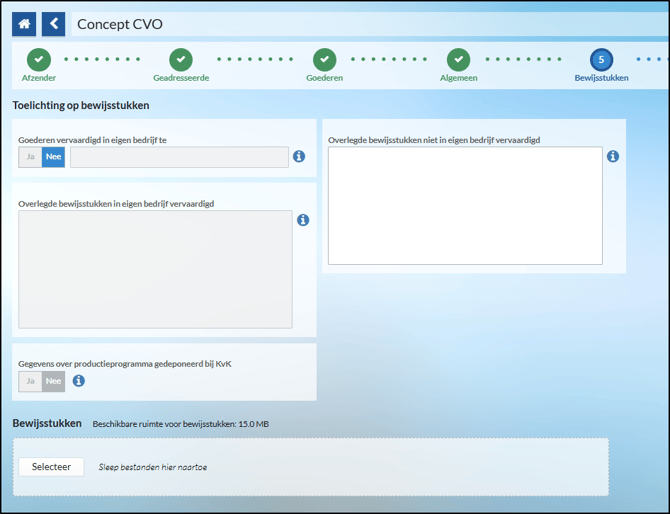
Path: Body.ChamberOfCommerce.COO
| Field in Shipment | JSON field | Type | Req. | Description |
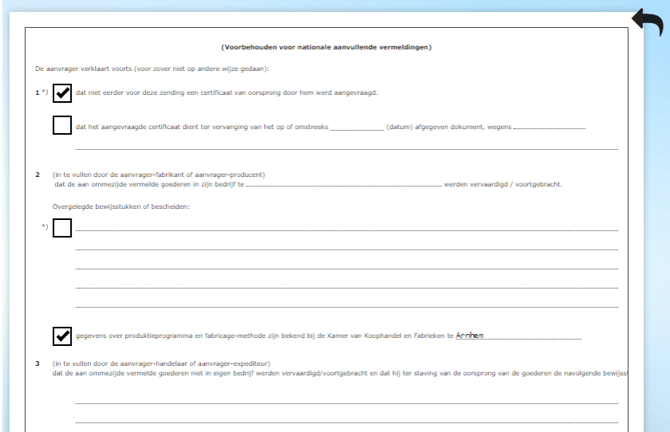
| Goederen vervaardigd in eigen bedrijf te | Manufacturer.Location |
string(34) |
✓ * | Place where you made the goods. With a value Shipment selects Ja, without a value Nee. Printed on the back of the certificate. * Required when you send Manufacturer. |
| Overlegde bewijsstukken in eigen bedrijf vervaardigd > Bewijsstuk | Manufacturer.Statement2Evidence |
array of string |
Evidence for goods made in your own company. One item per document. Printed on the back of the certificate. | |
| Gegevens over productieprogramma gedeponeerd bij KvK | Statement2No |
object |
Send this object when your production programme is deposited at the Chamber of Commerce. Printed on the back of the certificate. | |
| Overlegde bewijsstukken niet in eigen bedrijf vervaardigd > Bewijsstuk | Statement3Evidence |
array of string |
Evidence for goods made elsewhere or purchased. One item per document. Printed on the back of the certificate. |
Step 6: Legaliseren (Legalisation)
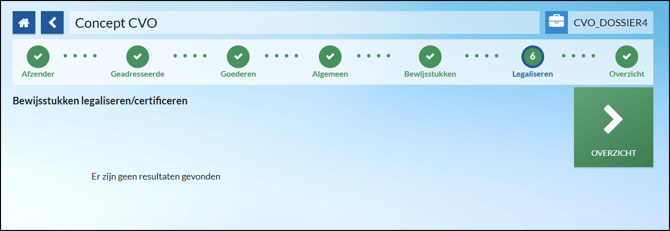
This step has no JSON fields. In Shipment a user can submit the supporting documents uploaded in step 5 to the Chamber of Commerce for legalisation or certification, and follow the status.
Values
These fields take a number. The table shows the meaning of each value.
| Field | Value | Meaning |
PartnerRole |
0 |
Consignor |
PartnerRole |
2 |
Consignee |
IdentType |
0 |
Customer ID |
IdentType |
1 |
EORI number |
CommentType |
0 |
Certificate of Origin |
CommentType |
1 |
EUR.1 / EUR-MED |
Result
The certificate created from the example file (see Downloads):
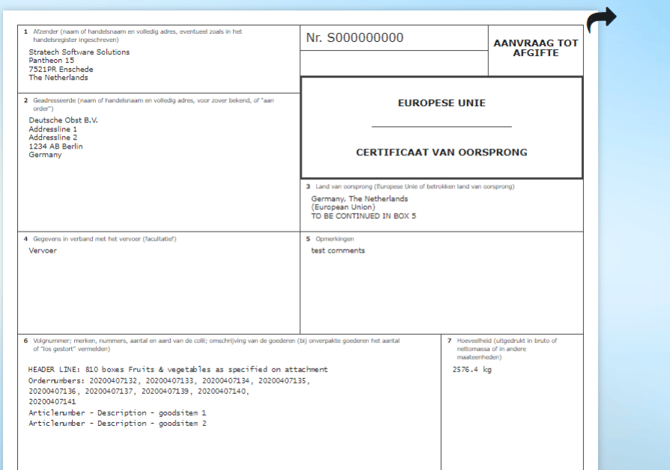
Response
The response has DossierId, StatusCode, Message and ValidationErrors. The meaning of the fields is in the article Chamber of Commerce.
Points to note
- A Chamber of Commerce document always starts a new dossier. You can add declarations or transport documents to that dossier later, with the same value in
dossierNumber. You cannot add a Chamber of Commerce document to a dossier that already has a declaration or a transport document. - Text fields are printed on the certificate. Keep to the maximum lengths, or the text does not fit.
- The request can contain more fields in
Body, such asTradeTerms,TransportDetailsandShipmentGoodsItems. They are not used on the Certificate of Origin. See the article Chamber of Commerce.