With the Customs module, you send customs declarations from your own platform to Shipment. Shipment validates them and submits them to Dutch Customs.
All customs messages go to the ImportDossier endpoint. The general rules (structure, control fields, limits, HTTP codes) are in Payload rules. This article explains what is specific to customs.
Message types
| Message type | Use it for | Array in the request |
| DMS Export | Export declaration | dmsExportDeclarations |
| DMS Import | Import declaration | dmsImportDeclarations |
| DMS EIDR | Entry in the declarant's records (EIDR), other than customs warehousing | dmsEIDRDeclarations |
| DMS EIDR Warehouse | EIDR for customs warehousing (procedure 71) | dmsEIDRWarehouseDeclarations |
| DVA Departure | Transit declaration in DVA (NCTS phase 5) | dvaDepartureDeclarations |
| DVA Arrival | Arrival notification for a transit movement in DVA | dvaArrivalDeclarations |
| Transit Departure | Transit declaration (previous system). Deprecated: use DVA Departure. | transitDepartureDeclarations |
| Transit Arrival | Arrival notification (previous system). Deprecated: use DVA Arrival. | transitArrivalDeclarations |
| EMCS Departure | Excise movement (e-AD) | emcsDepartureDeclarations |
Arrival at Exit (AES) and provisioning are described in Portbase and Single Window.
Structure of a declaration
Every declaration has the control fields from Payload rules (applicationReferenceId, doSubmitWhenValid, doNotSaveWhenInvalid, fullUserNameOfSubmitter), a declarationData object with the content, and one or more parties.
{
  "dossierNumber": "ERP_2026_000123",
  "dmsImportDeclarations": [
    {
      "applicationReferenceId": "ERP_2026_000123_IMP_1",
      "doSubmitWhenValid": false,
      "doNotSaveWhenInvalid": true,
      "declarationData": { },
      "importer": { "internalCode": "YOUR_IMPORTER_CODE" }
    }
  ]
}
Link to the address book (internalCode)
You don't have to send the full name and address of your own company in every declaration. Record your company once in the Shipment address book, with an internal code (Interne code) on the declarant. In the JSON you then send only that code. Shipment adds the details from the address book, including the EORI number.
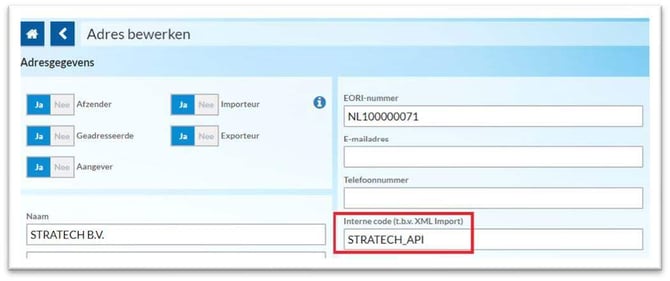
A Stratech employee explains how to set up the address book during onboarding. Ask the person who requested Shipment for the internal code, and use it in your integration.
The element that links to the address book depends on the message type. In the table, the declaration is made in your own name and on your own account.
| Message type | Element with the code |
| DMS Export | consignor.internalCode |
| DMS Import | importer.internalCode |
| DMS EIDR Warehouse (inbound, ABBI) | declarant.internalCode |
| DMS EIDR (outbound, ABBU) | importer.internalCode |
| DVA Departure | consignor.internalCode |
| DVA Arrival | destinationTrader.eoriNumber. This message links to the address book with the EORI number, not with an internal code. |
| EMCS Departure | consignorTrader.internalCode, together with consignorTrader.exciseNumber |
Parties per message type
Parties are usually identified with internalCode, the code of the party in the Shipment address book. See Link to the address book above.
| Message type | Required party | Optional parties |
| DMS Export | consignor (with internalCode) |
consignee |
| DMS Import | importer (with internalCode) |
exporter |
| DMS EIDR | importer |
exporter |
| DMS EIDR Warehouse | declarant (with internalCode) |
|
| DVA Departure | consignor, consignee |
|
| DVA Arrival | destinationTrader (EORI number) |
|
| Transit Departure | consignor |
consignee |
| Transit Arrival | destinationTrader |
|
| EMCS Departure | consignorTrader, consigneeTrader, placeOfDispatchTrader, deliveryPlaceTrader, transportArrangerTrader |
Note: EMCS uses consignorTrader, not consignor.
Common fields in declarationData
The full list per message type is in the OpenAPI specification. These fields come up most often:
| Field | Description |
isContainerShipment |
Whether the goods are transported in a container. Default false. Used in DMS Export, DMS Import, EIDR and Transit Departure. |
declarationOfficeCode, supervisingOfficeCode |
Customs office codes, 8 characters. |
goodsItems |
The goods items of the declaration. |
incoTerms |
Incoterm and location. |
transactionNatureCode |
Nature of the transaction, code list 091. |
additionalInformation |
Additional information. Only use it when Customs explicitly asks for it. |
EIDR and the chain procedure
For an EIDR declaration (entry in the declarant's records), declarationData has extra fields. They are used by IIAA permit holders who apply the chain procedure (ketenregeling).
| Field | Type | Default | Description |
declarationSymbol |
string, 2 | Required. IM or CO. |
|
applyChainProcedure |
boolean | false |
Apply the chain procedure to this declaration. |
canApplyChainProcedureInFuture |
boolean | false |
The chain procedure may be applied later. Also available for EIDR Warehouse. |
daysDelayBeforeSubmit |
integer, 0 to 99 | 0 |
Number of days Shipment waits before submitting. If you leave the field out, Shipment uses 0. Don't send it empty. |
governmentProcedure |
object | Required. The procedure codes. |
- Inbound (DMS EIDR Warehouse, ABBI): as an IIAA permit holder who wants to apply the chain procedure (Customs scenario C), set
canApplyChainProcedureInFuturetotrue. - Outbound (DMS EIDR, ABBU),
applyChainProcedureisfalse: Shipment applies scenario B. It sends the notification at removal (Aanbrengbericht bij Uitslag) and, afterdaysDelayBeforeSubmitdays, the supplementary declaration. - Outbound (DMS EIDR, ABBU),
applyChainProcedureistrue: Shipment applies scenario C. It sends only the supplementary declaration, afterdaysDelayBeforeSubmitdays.
Article master data (Artikelbestand)
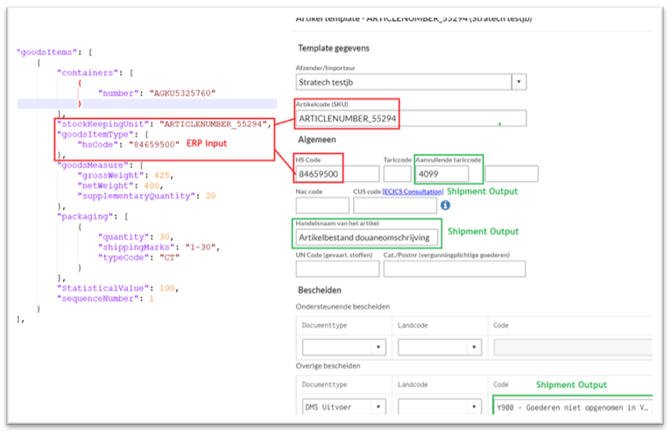
Data that is not in your ERP or WMS, but is needed in the declaration, can be stored in the Shipment article master data. Shipment then adds it to the declaration based on the article code. Examples are document codes (such as Y900) and additional TARIC codes (such as 4099).
To link a goods item to the article master data, send at least:
| Field | Description |
goodsItems[].stockKeepingUnit |
The article code (SKU), for example the article number in your ERP. |
goodsItems[].goodsItemType.hsCode |
The commodity code. |
Best practice: keep sending weights, quantities and statistical values from your ERP or WMS. Use the article master data only for data that is missing there.
Set up the article master data
The article master data is under Overzichten (Overviews).
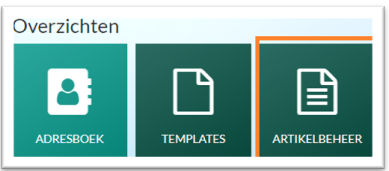
Create a new article in this screen.
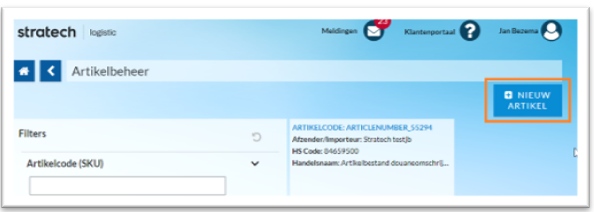
Record at least:
- The consignor or importer (Afzender / Importeur).
- The article code (Artikelcode, SKU). This is the link with
stockKeepingUnitin the JSON. - The commodity code (HS code).
You can record all other data in Shipment.
Example: the JSON on the left links to the article master data with stockKeepingUnit and hsCode. In the article master data on the right, additional code 4099 and document code Y900 are recorded for article ARTICLENUMBER_55294 with commodity code 84659500. From then on, Shipment adds both codes to every declaration with this article and commodity code.
Warning: leave out the fields that Shipment fills from the article master data. Leave them out completely: not as an empty array, empty object or empty value. This applies to
previousDocuments(previous documents),additionalDocuments(supporting documents) andadditionalReferences(additional references) of the goods item. An empty array such as"previousDocuments": []is not allowed.
Customs columns (MIG) per message type
When you send a declaration, Shipment first checks the JSON technically. Customs rules, such as which fields are required for a type of declaration, are in the DMS User Manual of Customs. In the User Manual only the tab 2. Declaration is relevant. Each column stands for a type of declaration, for example B1, with the requirements for every field.
The table shows which column belongs to which message type for DMS Export and DMS Import. In the MIG included in the DMS sample files, the column of that type of declaration is marked green. The DMS EIDR messages use different combinations of these columns.
| MIG column | Message type | Procedure (type of declaration) |
| B1 | DMS Export | 10.00 Export 31.71 Re-export |
| B2 | DMS Export | 21.xx Outward processing |
| H1 | DMS Import | 40.00 Release for free circulation 40.71 Release for free circulation after customs warehousing 40.51 Release for free circulation after inward processing |
| H2 | DMS Import | 71.xx Customs warehousing |
| H3 | DMS Import | 53.xx Temporary admission |
| H4 | DMS Import | 51.xx Inward processing |
xx stands for any value.
References in the response and status updates
| Message type | In the response | In status updates |
| DMS Export, DMS Import, DMS EIDR, DMS EIDR Warehouse | frn |
Frn, Mrn |
| DVA Departure, Transit Departure | frn |
Frn, Mrn |
| DVA Arrival, Transit Arrival | Mrn |
Mrn |
| EMCS Departure | frn |
Arc |
Status updates are optional and require the right modules. See the article Status updates.
Rules
- Maximum one DMS Export declaration per dossier.
- Line breaks are not allowed in customs messages. See the article Payload rules.
- Do you use the Shipment article master data? Leave out the fields Shipment fills from it. See Article master data above.
- Rejected by Customs? See the article Troubleshooting the Shipment API and the DMS rejection codes in the Customs knowledge base.
Field lists
Per message type there is a reference article with all fields, screen by screen. They are in this category: DMS Export and DMS Import. The other message types follow. All fields are also in the OpenAPI specification of your environment: /erpservices/swagger/v1/import.json.