A DMS EIDR Warehouse message is the presentation notification (ABBI, aanbrengbericht inslag) for goods that enter a customs warehouse (procedure 71). The goods are entered in the records of the warehouse. This article follows the screens of the notification in Shipment. For each screen you see which JSON field fills which field. The column Field in Shipment shows the section and the label as you see them on the screen.
A typical scenario: two goods items are entered into the customs warehouse. Each goods item has a previous document, for example the T1 (N821) with its MRN, or an NCLE with the entry reference. The authorisations contain both the EIDR authorisation (IIAA) and the customs warehouse authorisation (CWP). With canApplyChainProcedureInFuture you make sure the goods can later leave the warehouse with the chain procedure (see the article DMS EIDR).
How declarations, dossiers, the address book and the article master data work in general is in the article Customs.
| Endpoint | POST /erpservices/ImportDossier |
| Where in the request | dmsEIDRWarehouseDeclarations (array) |
| One request | One dossier, maximum 10 declarations per request in total. |
DeclarationType in status updates |
3 |
| Reference in the response | frn |
Downloads
- Download - DMS EIDR Warehouse (ABBI) 71.00 (.json)
- Download - DMS EIDR Warehouse (ABBI) 71.00 with previous documents (.json)
- Download - DMS EIDR Warehouse (ABBI) with containers (.json)
Endpoint
POST {base-url}/erpservices/ImportDossier
Replace {base-url} with the URL of your product and environment:
| Product and environment | {base-url} |
| Stratech Shipment – Test | https://test-{prefix}.shipment-stratech.nl |
| Stratech Shipment – Production | https://{prefix}.stratechshipment.nl |
| Beurtvaartadres ShipmentManager – Test | https://{prefix}.accshipmentmanager.eu |
| Beurtvaartadres ShipmentManager – Production | https://{prefix}.shipmentmanager.eu |
Structure
The request is a dossier with the declaration in the array dmsEIDRWarehouseDeclarations. The paths in the tables below start at one item of that array.
How to read the tables
The column Req. shows what the API requires: ✓ means the request is rejected without the field. Default means Shipment fills in that value when you leave the field out. Which fields Customs requires depends on the type of declaration; those rules are in the MIG (see Downloads). Shipment checks them when it validates the declaration.
Control fields
| Field in Shipment | JSON field | Type | Req. | Description |
| – | applicationReferenceId |
string |
✓ | Your unique reference for this declaration. Never reuse it, not even when you send the same dataset again. A duplicate returns HTTP 409. |
| – | doSubmitWhenValid |
boolean |
Default false. true: Shipment submits the declaration to Customs as soon as it is valid. |
|
| – | doNotSaveWhenInvalid |
boolean |
Default false: an invalid declaration is saved, so a user can complete it in Shipment. true: an invalid declaration is not saved and you get the errors back. |
|
| – | fullUserNameOfSubmitter |
string(64) |
Full name of the user who submits the declaration. |
Step 1: Aangifte (Declaration)
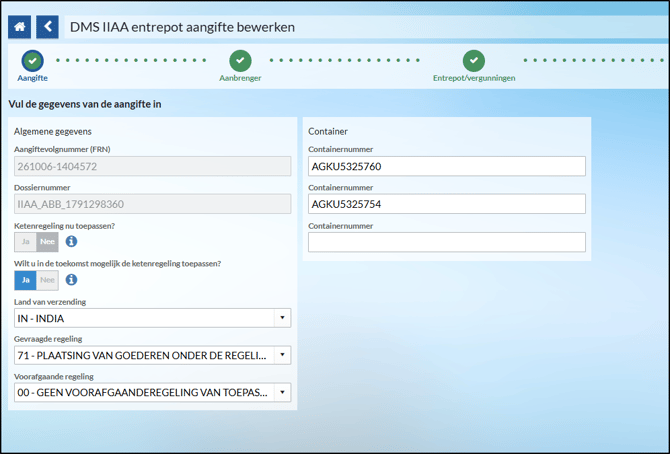
Path: declarationData
| Field in Shipment | JSON field | Type | Req. | Description |
| Algemene gegevens > Dossiernummer | dossierNumber |
string(30) |
✓ | At the top of the request, outside the declaration: dossierNumber. The dossier name in Shipment, for example your order or delivery number. |
| Algemene gegevens > Wilt u in de toekomst mogelijk de ketenregeling toepassen? | canApplyChainProcedureInFuture |
boolean |
true: the goods can later leave the warehouse with the chain procedure (scenario C). |
|
| Algemene gegevens > Land van verzending | dispatchCountry |
string(2) |
✓ | Dispatch country of the incoming shipment. Code list CL199. |
| Algemene gegevens > Gevraagde regeling | governmentProcedure.currentCode |
string(2) |
✓ | Requested customs procedure code. Code list CL092. |
| Algemene gegevens > Voorafgaande regeling | governmentProcedure.previousCode |
string(2) |
✓ | Previous customs procedure code. Code list CL093. |
| Container > Containernummer | containers[].number |
string(17) |
Container number. Send one item per container. |
Step 2: Aanbrenger (Declarant)
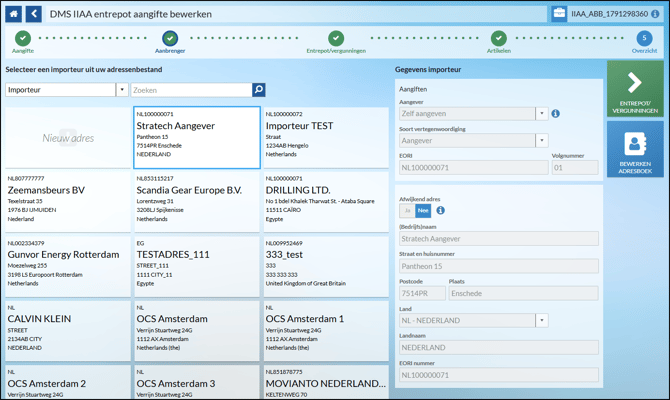
Path: declarant
| Field in Shipment | JSON field | Type | Req. | Description |
| Aanbrenger > Geselecteerde aanbrenger | internalCode |
string(450) |
✓ | Internal code used to select the declarant from the address book. |
| Aanbrenger > Adresboek (Address book) > Naam | address.name |
string |
✓ | Name of the declarant. Only when you do not use the address book. |
| Aanbrenger > Adresboek (Address book) > Plaats | address.city |
string |
✓ | City. |
| Aanbrenger > Adresboek (Address book) > Straat en huisnummer | address.streetAndNumber |
string |
✓ | Street and house number. |
| Aanbrenger > Adresboek (Address book) > Land | address.country.code |
string |
✓ | Country code (code list CL248). |
| Aanbrenger > Adresboek (Address book) > Land | address.country.name |
string |
✓ | Country name. |
| Aanbrenger > Adresboek (Address book) > Postcode | address.zipCode |
string |
Postal code. | |
| Aanbrenger > Adresboek (Address book) > EORI-nummer | eoriNumber |
string |
EORI number of the declarant. | |
| Aanbrenger > – | submitter.representationType |
integer |
Type of representation when someone else submits on behalf of the declarant. Values: 1 = Direct, 2 = Indirect, 3 = WithoutPermit. |
|
| Aanbrenger > – | submitter.eoriNumber |
string |
✓ | EORI number of the representative who submits the notification. |
Shipment takes the name, address and EORI number of the declarant from the address book. How the link works is in the article Customs, section Link to the address book (internalCode). The fields under address are only needed when you do not use the address book; if you send an address, name, street and number, city and country are required.
Step 3: Entrepot/Vergunningen (Warehouse and authorisations)
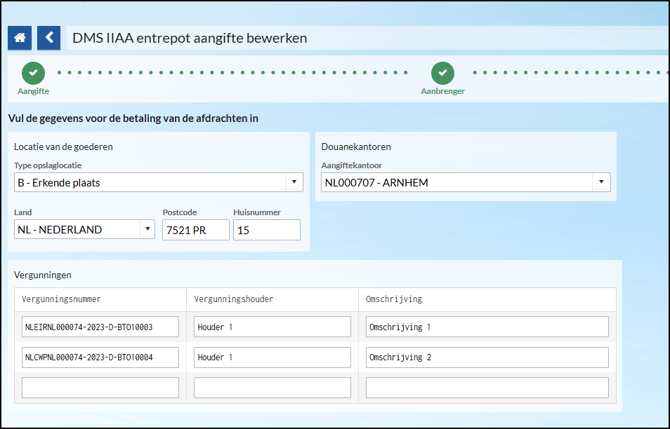
Locatie van de goederen
Path: declarationData.goodsLocation
| Field in Shipment | JSON field | Type | Req. | Description |
| Type opslaglocatie | type |
string(1) |
Goods location type. Code list CL347. | |
| Land | countryCode |
string(2) |
Country code of goods location. Code list CL199. | |
| Postcode | postalCode |
string(17) |
Postal code of goods location. | |
| Huisnummer | houseNumber |
string(35) |
House number of goods location. | |
| – | identificationType |
string(1) |
The type of the identification (code list CL326). |
Douanekantoren
| Field in Shipment | JSON field | Type | Req. | Description |
| Aangiftekantoor | declarationData.declarationOfficeCode |
string(8) |
Declaration office code. Code list CL141. |
Vergunningen
Path: declarationData.authorisations[]
| Field in Shipment | JSON field | Type | Req. | Description |
| Vergunningsnummer | identification |
string(35) |
Authorisation identification number. | |
| Vergunningshouder | authorisationHolder.identification |
string(17) |
Authorisation holder identification. | |
| Omschrijving | description |
string |
Description of the authorisation. |
For an entry into a customs warehouse you usually send two authorisations: the EIDR authorisation (IIAA) and the customs warehouse authorisation (CWP). The field description is for your own records and is not sent to Customs.
Step 4: Artikelen (Goods items), totals
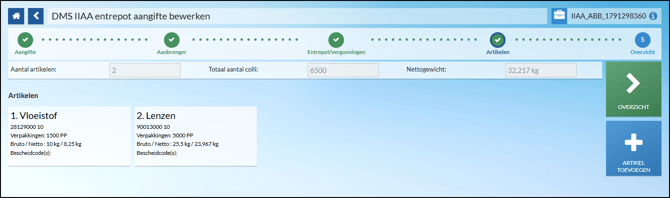
| Field in Shipment | JSON field | Type | Req. | Description |
| Aantal artikelen | – | No JSON field. Calculated from total number of goods items. | ||
| Totaal aantal colli | – | No JSON field. Calculated from packaging quantities of all goods items. | ||
| Nettogewicht | – | No JSON field. Calculated from net weights of all goods items. | ||
| Artikeltegel | – | No JSON field. Visual summary of goods item data. | ||
| Artikel toevoegen | – | No JSON field. Opens goods item entry screen. | ||
| Overzicht | – | No JSON field. Navigates to summary screen. |
Step 4: Artikelen (Goods items), goods item
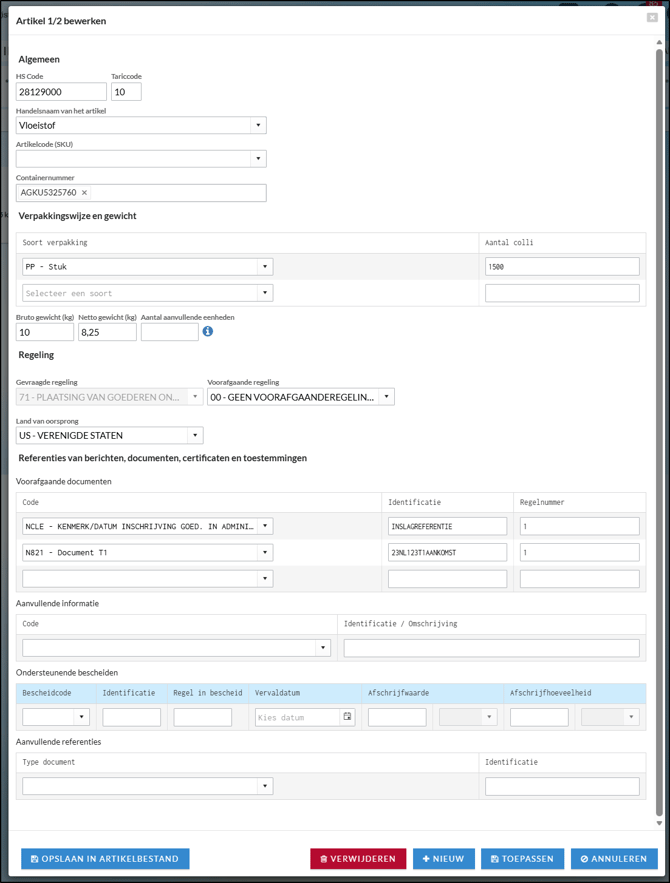
Algemeen
Path: declarationData.goodsItems[]
| Field in Shipment | JSON field | Type | Req. | Description |
| Artikelnummer | sequenceNumber |
integer |
Unique sequential number of the record. Sequence numbering starts at 1 and increments by 1. | |
| HS Code | goodsItemType.hsCode |
string(8) |
Commodity HS code. | |
| Tariccode | goodsItemType.taricSubHeading |
string(2) |
TARIC subheading code. | |
| Handelsnaam van het artikel | description |
string(512) |
Goods description. | |
| Artikelcode (SKU) | stockKeepingUnit |
string |
Stock keeping unit reference. | |
| Containernummer > Volgnummer | – | No JSON field. Shipment numbers the lines in the order of the array. | ||
| Containernummer | containers[].number |
string(17) |
Container number linked to the goods item. |
Verpakkingswijze en gewicht
Path: declarationData.goodsItems[]
| Field in Shipment | JSON field | Type | Req. | Description |
| Verpakking > Volgnummer | – | No JSON field. Shipment numbers the lines in the order of the array. | ||
| Verpakking > Soort verpakking | packaging[].typeCode |
string(2) |
Package type code. Code list CL017. | |
| Verpakking > Aantal colli | packaging[].quantity |
integer |
Number of packages. | |
| Bruto gewicht (kg) | goodsMeasure.grossWeight |
number |
Gross weight in kilograms. | |
| Netto gewicht (kg) | goodsMeasure.netWeight |
number |
Net weight in kilograms. | |
| Aantal aanvullende eenheden | – | No JSON field. |
Regeling
Path: declarationData
| Field in Shipment | JSON field | Type | Req. | Description |
| Gevraagde regeling | governmentProcedure.currentCode |
string(2) |
✓ | Requested customs procedure code. Code list CL092. |
| Voorafgaande regeling | goodsItems[].governmentProcedure.previousCode |
string(2) |
Previous customs procedure code. Code list CL093. | |
| Land van oorsprong | goodsItems[].countryOfOrigin |
string(2) |
Country of origin. Code list CL008. |
Voorafgaande documenten
Path: declarationData.goodsItems[]
| Field in Shipment | JSON field | Type | Req. | Description |
| Volgnummer | – | No JSON field. Shipment numbers the lines in the order of the array. | ||
| Code | previousDocuments[].documentTypeCode |
string(4) |
Replaced by previousDocument. Still works. Code list CL214. |
|
| Identificatie | previousDocuments[].documentIdentifier |
string(70) |
Replaced by previousDocument. Still works. |
|
| Regelnummer | previousDocuments[].declarationLineNumber |
integer |
Replaced by previousDocument. Still works. |
|
| Code | previousDocument.documentTypeCode |
string(4) |
Type of the previous document, for example N821 (T1) or NCLE. Code list CL214. | |
| Identificatie | previousDocument.documentIdentifier |
string(70) |
Identifier of the previous document, for example the MRN of the T1. | |
| Regelnummer | previousDocument.declarationLineNumber |
integer |
Line number in the previous document. |
Aanvullende informatie
Path: declarationData.goodsItems[].additionalInformation[]
| Field in Shipment | JSON field | Type | Req. | Description |
| Code | code |
string(5) |
Additional information code. Code list CL239. | |
| Omschrijving | description |
string(512) |
Additional information description. |
Ondersteunende bescheiden
Path: declarationData.goodsItems[].additionalDocuments[]
| Field in Shipment | JSON field | Type | Req. | Description |
| Volgnummer | – | No JSON field. Shipment numbers the lines in the order of the array. | ||
| Bescheidcode | additionalDocumentCode |
string(4) |
Supporting document code. Code list CL213. | |
| Identificatie | documentNumber |
string(70) |
Supporting document identifier. | |
| Regel in bescheid | lineNumber |
integer |
Supporting document line number. | |
| Vervaldatum | validityDate |
datetime |
Supporting document validity date. | |
| Afschrijfwaarde | amount.value |
number |
Consumed amount value. | |
| Eenheid afschrijfwaarde | amount.code |
string |
Consumed amount unit. | |
| Afschrijfhoeveelheid | quantity.value |
number |
Consumed quantity value. | |
| Eenheid afschrijfhoeveelheid | quantity.code |
string |
Consumed quantity unit. |
Aanvullende referenties
Path: declarationData.goodsItems[].additionalReferences[]
| Field in Shipment | JSON field | Type | Req. | Description |
| Volgnummer | – | No JSON field. Shipment numbers the lines in the order of the array. | ||
| Type document | typeCode |
string(4) |
Additional reference type code. Code list CL380. | |
| Identificatie | identification |
string(70) |
Additional reference identifier. |
Inschrijving in de administratie
Path: declarationData.goodsItems[].registration
| Field in Shipment | JSON field | Type | Req. | Description |
| Identificatie | identifier |
string(70) |
Identifier of the entry in the records (inschrijving in de administratie). | |
| Regelnummer | lineNumber |
integer |
Line number of the entry in the records. |
Note:
previousDocuments(an array) still works, but is replaced bypreviousDocument(one object per goods item). UsepreviousDocumentin new integrations.
Response
The response has one result per notification in dmsEIDRWarehouseDeclarationResults: applicationReferenceId, isSaved, isSubmitted, errors and frn. HTTP 200 does not mean every notification is valid: always check isSaved and errors. All HTTP codes are in the article Payload rules.
Points to note
- Code list fields must contain the exact code from the Customs code list. See the article Code lists.
- Line breaks are not allowed in customs messages.
- Do you use
stockKeepingUnitwith the article master data? Leave outpreviousDocuments,additionalDocumentsandadditionalReferencescompletely, so Shipment can fill them from the article master data. See the article Customs. - Want the goods to leave the warehouse later with the chain procedure? Set
canApplyChainProcedureInFuturetotruein this notification. The outbound message is in the article DMS EIDR.