A DMS Export declaration is the export declaration to Dutch Customs (DMS). This article follows the screens of the export declaration in Shipment. For each screen you see which JSON field fills which field. The column Nr is the number in the screenshot.
How declarations, dossiers and the address book work in general is in the article Customs. Which Customs rules apply per type of declaration (MIG column B1 or B2) is also explained there.
| Endpoint | POST /erpservices/ImportDossier |
| Module | Customs (DMS Export) |
| Where in the request | dmsExportDeclarations (array) |
| One request | One dossier. Maximum one DMS Export declaration per dossier, and maximum 10 declarations per request in total. |
DeclarationType in status updates |
2 |
| Reference in the response | frn |
Downloads
The sample files are complete, valid messages. The MIG shows the Customs requirements per field, with the matching JSON field.
- Download - Multiple seals per container (.json)
- Download - Security and authorisation on goods item (.json)
- Download - e-Balie and C-Point (.json)
- Download - MIG 1.30 with Stratech JSON tags, 10.00 (.xlsx)
Endpoint
POST {base-url}/erpservices/ImportDossier
Replace {base-url} with the URL of your product and environment:
| Product and environment | {base-url} |
| Stratech Shipment – Test | https://test-{prefix}.shipment-stratech.nl |
| Stratech Shipment – Production | https://{prefix}.stratechshipment.nl |
| Beurtvaartadres ShipmentManager – Test | https://{prefix}.accshipmentmanager.eu |
| Beurtvaartadres ShipmentManager – Production | https://{prefix}.shipmentmanager.eu |
Warning: the path has no version number. Use
/erpservices/ImportDossier, not/erpservices/v1/ImportDossier.
Structure
The request is a dossier with one export declaration in it. The paths in the tables below start at one item of dmsExportDeclarations.
{
  "dossierNumber": "...",
  "dmsExportDeclarations": [
    {
      "applicationReferenceId": "...",
      "declarationData": { ..., "goodsItems": [ ... ] },
      "consignor": { ... },
      "consignee": { ... }
    }
  ]
}
How to read the tables
The column Nr is the number in the screenshot; a dash means the field is not numbered on the screen. The column Req. shows what the API requires: ✓ means the request is rejected without the field. Default means Shipment fills in that value when you leave the field out. Which fields Customs requires depends on the type of declaration; those rules are in the MIG (see Downloads). Shipment checks them when it validates the declaration.
Control fields
These fields control the request. They are not shown in a screen.
| Nr | JSON field | Type | Req. | Description |
applicationReferenceId |
string |
✓ | Your unique reference for this declaration. Never reuse it for a new declaration, not even when you send the same dataset again. A duplicate returns HTTP 409. | |
doSubmitWhenValid |
boolean |
Default false |
true: Shipment submits the declaration to Customs as soon as it is valid. |
|
doNotSaveWhenInvalid |
boolean |
Default false |
false: an invalid declaration is saved, so a user can complete it in Shipment. true: an invalid declaration is not saved. |
|
fullUserNameOfSubmitter |
string(64) |
Full name of the user who submits the declaration. |
Step 1: Aangifte (Declaration)
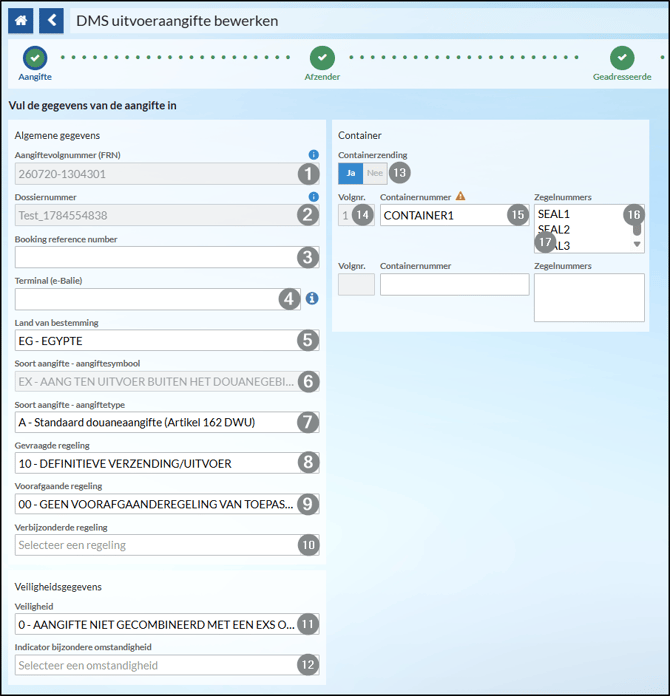
Path: declarationData
| Nr | JSON field | Type | Req. | Description |
| 1 | – | Functional reference number (FRN). Shipment generates it and returns it in the response as frn. |
||
| 2 | dossierNumber |
string(30) |
✓ | Not under declarationData: at the top of the request, outside the declaration. The dossier name in Shipment, for example your order, delivery or transport number. |
| 3 | bookingReferenceNumber |
string(35) |
Booking reference. Only for a Portbase notification. Not needed to create the notification, but needed to submit it. | |
| 4 | terminal |
string(15) |
Terminal. Only for an e-Balie (C-Point) notification. Not needed to create the notification, but needed to submit it. | |
| 5 | destinationCountry |
string(2) |
✓ | Country of destination. Code list CL008. |
| 6 | – | Declaration symbol. Spec 2.15 has no JSON field for it; Shipment fills it. | ||
| 7 | declarationType |
string(1) |
Default A |
Type of declaration, 2nd subdivision. Code list CL042. A = normal declaration. |
| – | simplificationType |
string(5) |
Type of simplification. Code list CL239, the codes that start with NRV. | |
| – | acceptanceDate |
datetime |
Acceptance date. Only for declaration type R. |
|
| 8 | governmentProcedure.currentCode |
string(2) |
✓ | Requested procedure. Code list CL092. For example 10 (export). |
| 9 | governmentProcedure.previousCode |
string(2) |
✓ | Previous procedure. Code list CL093. For example 00. |
| 10 | governmentProcedure.specialCode |
string(3) |
Additional procedure. Code list CL102. | |
| 11 | security |
string(1) |
Default 0 |
Security (safety and security data). Code list CL217. |
| 12 | specificCircumstances |
string(3) |
Specific circumstance indicator. Code list CL296. | |
| 13 | isContainerShipment |
boolean |
Default false |
true: the goods are transported in containers. Only then are the container numbers sent to Customs. |
| 14 | transportEquipment[].sequenceNumber |
integer |
✓ | Sequence number of the container (1, 2, 3, …). Goods items refer to this number. Up to 9999 containers. |
| 15 | transportEquipment[].number |
string(17) |
Container number. | |
| 16 | – | Sequence number of the seal. Shipment numbers the seals in the order you send them. | ||
| 17 | transportEquipment[].seals[].number |
string(20) |
Seal number. A container can have several seals. |
Several seals on one container:
"transportEquipment": [{
  "sequenceNumber": 1,
  "number": "MSKU1234565",
  "seals": [{ "number": "SEAL001" }, { "number": "SEAL002" }]
}]
Note:
declarationData.containersis deprecated. UsetransportEquipment.
Step 2: Afzender (Consignor)
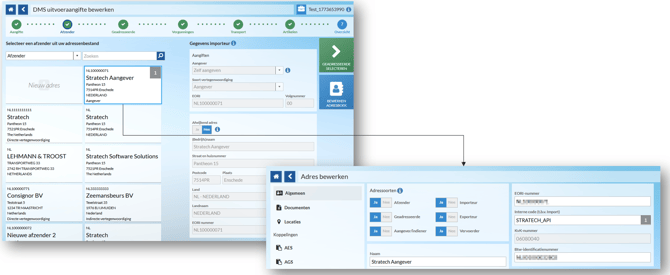
Path: consignor
| Nr | JSON field | Type | Req. | Description |
| 1 | internalCode |
string(450) |
✓ | Code of the consignor in the address book of Shipment. Shipment takes the name, address and EORI number from the address book. |
| – | address.name |
string |
Only if you don't use the address book. If you send an address, name, street and number, city and country are required. | |
| – | address.streetAndNumber |
string |
Street and house number. | |
| – | address.zipCode |
string |
Postal code. | |
| – | address.city |
string |
City. | |
| – | address.country.code |
string |
Country code. Code list CL248. | |
| – | address.country.name |
string |
Country name. | |
| – | eoriNumber |
string |
EORI number of the consignor. | |
| – | submitter.eoriNumber |
string |
EORI number of the declarant, if it is not the consignor. Required when you send submitter. |
|
| – | submitter.representationType |
integer |
Type of representation: 1 direct, 2 indirect, 3 without permit. |
How the address book link works is in the article Customs, section Link to the address book (internalCode).
Step 3: Geadresseerde (Consignee)
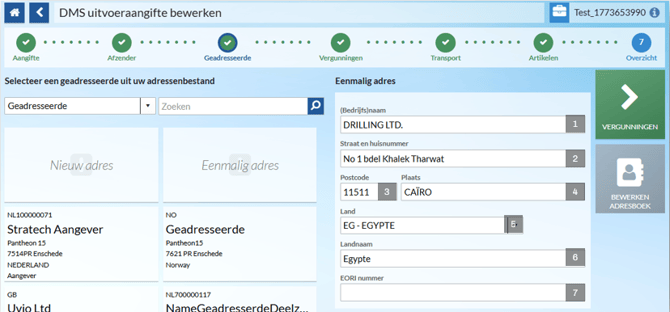
Path: consignee
| Nr | JSON field | Type | Req. | Description |
| – | internalCode |
string(450) |
Code of the consignee in the address book. Optional. If you use it, you can leave out the fields below. | |
| 1 | address.name |
string |
Name of the consignee. Required when you send an address. | |
| 2 | address.streetAndNumber |
string |
Street and house number. Required when you send an address. | |
| 3 | address.zipCode |
string |
Postal code. | |
| 4 | address.city |
string |
City. Required when you send an address. | |
| 5 | address.country.code |
string |
Country code. Code list CL248. Required when you send an address. | |
| 6 | address.country.name |
string |
Country name. Required when you send an address. | |
| 7 | eoriNumber |
string |
EORI number of the consignee. |
Step 4: Vergunningen (Authorisations)
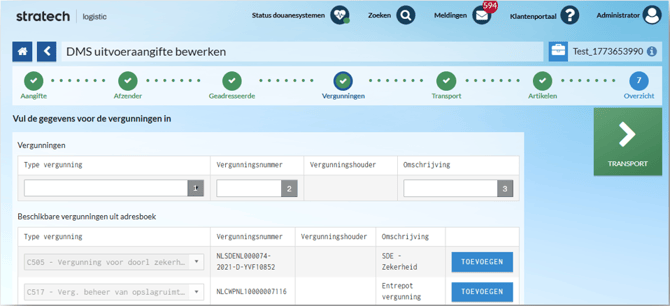
Authorisations for the whole declaration. Up to 9. Authorisations for one goods item are in step 6.
Path: declarationData.authorisations[]
| Nr | JSON field | Type | Req. | Description |
| 1 | identification |
string(35) |
Authorisation number. | |
| 2 | type |
string(4) |
Type of authorisation. Code list CL605. | |
| 3 | description |
string |
Description, for your own administration. Not sent to Customs. | |
| – | authorisationHolder.identification |
string(17) |
EORI number of the authorisation holder. |
Step 5: Transport (part 1)
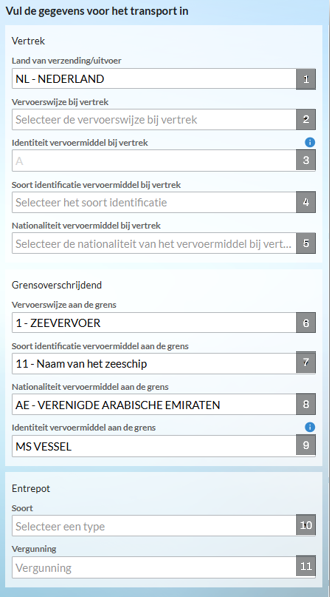
Path: declarationData
| Nr | JSON field | Type | Req. | Description |
| 1 | exportCountry |
string(2) |
Country of export. Code list CL010. [VERIFY: the old article names this field countryOfOrigin, which is not in spec 2.15.] | |
| 2 | departureTransportMeans.transportationType |
string(1) |
Mode of transport at departure (inland). Code list CL018. | |
| 3 | departureTransportMeans.identification |
string(35) |
Identification of the means of transport at departure, for example a licence plate. | |
| 4 | departureTransportMeans.identificationType |
string(2) |
Type of identification. Code list CL750. | |
| 5 | departureTransportMeans.registrationNationality |
string(2) |
Nationality of the means of transport. Code list CL165. | |
| 6 | borderTransportMeans.transportationType |
string(1) |
Mode of transport at the border. Code list CL018. With 1 (sea transport) and a port as office of exit, Shipment can create a Portbase notification. See Portbase and C-Point below. |
|
| 7 | borderTransportMeans.identificationType |
string(2) |
Type of identification of the active means of transport at the border. Code list CL750. | |
| 8 | borderTransportMeans.registrationNationality |
string(2) |
Nationality of the means of transport at the border. Code list CL165. | |
| 9 | borderTransportMeans.identification |
string(35) |
Identification of the means of transport at the border, for example the IMO number of the vessel. | |
| 10 | warehouse.type |
string(1) |
Type of warehouse. Code list CL099. | |
| 11 | warehouse.licenseNumber |
string(35) |
Authorisation number of the warehouse. |
Trailers and rail wagons are not numbered on the screen:
Path: declarationData.departureTransportMeans
| Nr | JSON field | Type | Req. | Description |
| – | trailerTransportMeans[].identification |
string(35) |
Licence plate of the trailer. Use with transportationType 3 (road transport). |
|
| – | trailerTransportMeans[].registrationNationality |
string(2) |
Nationality of the trailer. Code list CL165. | |
| – | wagonTransportMeans[].identification |
string(35) |
Number of the rail wagon. Use with transportationType 2 (rail transport). |
|
| – | wagonTransportMeans[].registrationNationality |
string(2) |
Nationality of the rail wagon. Code list CL165. |
Step 5: Transport (part 2)
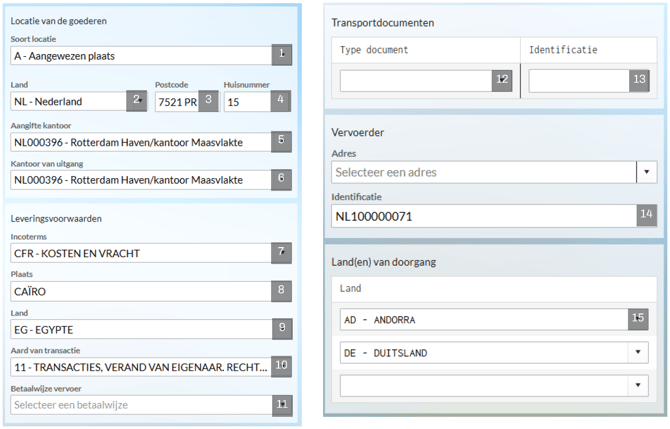
Path: declarationData
| Nr | JSON field | Type | Req. | Description |
| 1 | goodsLocation.type |
string(1) |
Type of location of the goods. Code list CL347. | |
| 2 | goodsLocation.countryCode |
string(2) |
Country of the location. Code list CL248. | |
| 3 | goodsLocation.postalCode |
string(17) |
Postal code of the location. | |
| 4 | goodsLocation.houseNumber |
string(35) |
House number of the location. | |
| – | goodsLocation.cityName |
string(35) |
City of the location. | |
| – | goodsLocation.addressLine |
string(70) |
Street of the location. | |
| 5 | declarationOfficeCode |
string(8) |
Customs office of export. Code list CL293. | |
| 6 | exitOfficeCode |
string(8) |
Customs office of exit. Code list CL194. With a Belgian port, Shipment can create a C-Point notification. See Portbase and C-Point below. | |
| 7 | incoTerms.incoTermsCode |
string(3) |
Incoterm. Code list CL090. | |
| 8 | incoTerms.countryCode |
string(2) |
Country of the Incoterm location. Code list CL199. | |
| 9 | incoTerms.locationName |
string(35) |
Name of the Incoterm location. | |
| – | incoTerms.locationCode |
string(17) |
Code of the Incoterm location. Code list CL244. | |
| – | incoTerms.incoTermsDescription |
string(512) |
Description of the Incoterm. | |
| 10 | transactionNatureCode |
string(2) |
Nature of transaction. Code list CL091. | |
| 11 | paymentMethodCode |
string(1) |
Method of payment for transport costs. Code list CL116. | |
| 12 | transportDocuments[].typeCode |
string(4) |
Type of transport document. Code list CL754. Up to 99 documents. | |
| 13 | transportDocuments[].identification |
string(70) |
Number of the transport document. | |
| 14 | carrier.identification |
string(17) |
EORI number of the carrier. If you send it, carrier.internalCode is ignored. |
|
| – | carrier.internalCode |
string(450) |
Code of the carrier in the address book. | |
| 15 | itineraries[].countryOfRouting |
string(2) |
Countries the goods pass through, in order. Code list CL008. |
Step 6: Artikelen (Goods items), totals
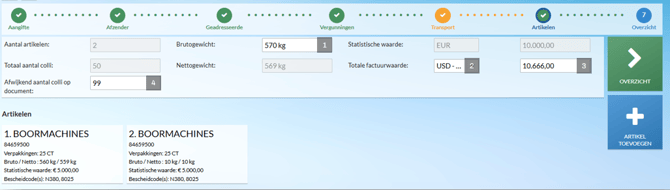
Path: declarationData
| Nr | JSON field | Type | Req. | Description |
| 1 | totalGrossWeight |
number |
Total gross weight in kg. | |
| 2 | totalInvoiceCurrency |
string(3) |
Currency of the invoice, for example EUR. |
|
| 3 | totalInvoiceAmount |
number |
Total invoice amount. | |
| 4 | divergentTotalPackagesAmount |
integer |
Number of packages that differs from the calculated total. This number is printed on the accompanying document; Customs receives the calculated number. |
Step 6: Artikelen (Goods items), part 1
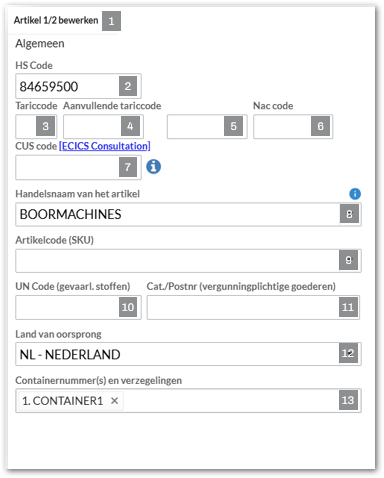
Up to 999 goods items per declaration.
Path: declarationData.goodsItems[]
| Nr | JSON field | Type | Req. | Description |
| 1 | sequenceNumber |
integer |
Sequence number of the goods item: 1 for the first, then +1 for every item. | |
| 2 | goodsItemType.hsCode |
string(8) |
Commodity code. 8 digits: Combined Nomenclature (TSP). 6 digits: HS. | |
| 3 | goodsItemType.taricSubHeading |
string(2) |
TARIC subheading (TRC). | |
| 4 | goodsItemType.additionalTaricCode1 |
string(4) |
First TARIC additional code (TRA). | |
| 5 | goodsItemType.additionalTaricCode2 |
string(4) |
Second TARIC additional code (TRA). | |
| 6 | goodsItemType.nac |
string(4) |
National additional code (GN). | |
| 7 | goodsItemType.cusCode |
string(9) |
CUS code (Customs Union and Statistics). | |
| 8 | description |
string(512) |
Description of the goods. | |
| 9 | stockKeepingUnit |
string |
Article number (SKU). Not sent to Customs. Shipment uses it to find the article in the article master data and fills the empty fields of the goods item from it. The consignor determines which article master data is used. | |
| 10 | unitedNationsCode |
string(4) |
UN number for dangerous goods. | |
| 11 | categoryOrPostalNumber |
string(10) |
Category or postal number. | |
| 12 | countryOfOrigin |
string(2) |
Country of origin of the goods. Code list CL008. | |
| 13 | transportEquipment |
array of integer |
The containers this goods item is in: the sequenceNumber values from step 1. For example [1] for the first container. |
Step 6: Artikelen (Goods items), part 2
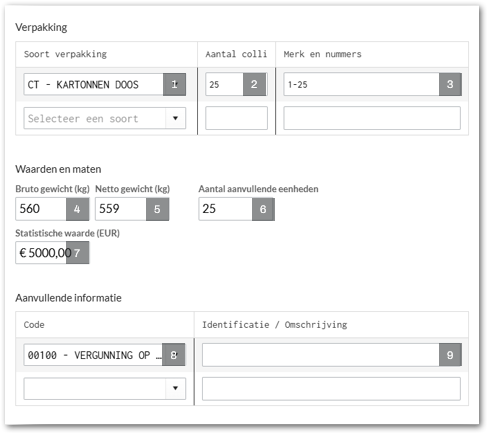
Path: declarationData.goodsItems[]
| Nr | JSON field | Type | Req. | Description |
| 1 | packaging[].typeCode |
string(2) |
Type of packaging. Code list CL017. | |
| 2 | packaging[].quantity |
integer |
Number of packages. | |
| 3 | packaging[].shippingMarks |
string(512) |
Shipping marks. | |
| 4 | goodsMeasure.grossWeight |
number |
Gross weight in kg. | |
| 5 | goodsMeasure.netWeight |
number |
Net weight in kg. | |
| 6 | goodsMeasure.supplementaryQuantity |
number |
Supplementary unit. | |
| 7 | statisticalValue |
number |
Statistical value. | |
| 8 | additionalInformation[].code |
string(5) |
Code of the additional information. Code list CL239. | |
| 9 | additionalInformation[].description |
string(512) |
Text of the additional information. |
Step 6: Artikelen (Goods items), part 3
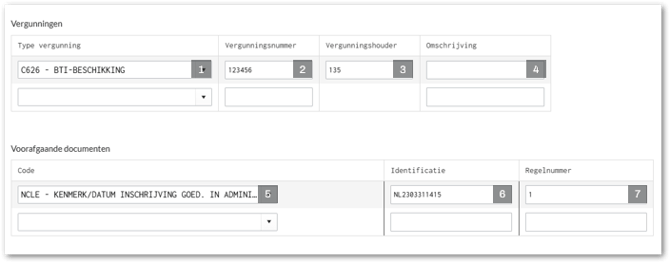
Path: declarationData.goodsItems[].authorisations[]
| Nr | JSON field | Type | Req. | Description |
| 1 | type |
string(4) |
Type of authorisation for this goods item. Code list CL605. Up to 9. | |
| 2 | identification |
string(35) |
Authorisation number. | |
| 3 | authorisationHolder.identification |
string(17) |
EORI number of the authorisation holder. | |
| 4 | description |
string |
Description, for your own administration. Not sent to Customs. |
Path: declarationData.goodsItems[]
| Nr | JSON field | Type | Req. | Description |
| 5 | previousDocument.documentTypeCode |
string(4) |
Type of previous document. Code list CL214. | |
| 6 | previousDocument.documentIdentifier |
string(70) |
Number of the previous document. | |
| 7 | previousDocument.declarationLineNumber |
integer |
Line number in the previous document. | |
| – | previousDocuments[].documentTypeCode |
string(4) |
Replaced by previousDocument. Still works. |
|
| – | previousDocuments[].documentIdentifier |
string(70) |
Replaced by previousDocument. Still works. |
|
| – | previousDocuments[].declarationLineNumber |
integer |
Replaced by previousDocument. Still works. |
Note:
previousDocuments(an array) still works, but is replaced bypreviousDocument(one object per goods item). UsepreviousDocumentin new integrations.
Step 6: Artikelen (Goods items), part 4
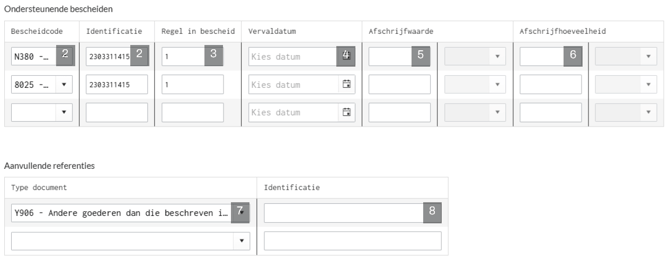
Path: declarationData.goodsItems[]
| Nr | JSON field | Type | Req. | Description |
| 1 | additionalDocuments[].additionalDocumentCode |
string(4) |
Type of supporting document. Code list CL213. | |
| 2 | additionalDocuments[].documentNumber |
string(70) |
Number of the document. | |
| 3 | additionalDocuments[].lineNumber |
integer |
Line number in the document. | |
| 4 | additionalDocuments[].validityDate |
datetime |
Expiry date of the document. | |
| 5 | additionalDocuments[].amount.value |
number |
Amount written off the document. | |
| 5 | additionalDocuments[].amount.code |
string |
Currency or unit of the amount. | |
| 6 | additionalDocuments[].quantity.value |
number |
Quantity written off the document. | |
| 6 | additionalDocuments[].quantity.code |
string |
Unit of the quantity. | |
| 7 | additionalReferences[].typeCode |
string(4) |
Type of additional reference. Code list CL380. | |
| 8 | additionalReferences[].identification |
string(70) |
The additional reference. | |
| – | registration.identifier |
string(70) |
Registration identifier. | |
| – | registration.lineNumber |
integer |
Line number of the registration. |
Note:
goodsItems[].containersis deprecated. UsegoodsItems[].transportEquipment.
Portbase and C-Point
From an export declaration, Shipment can create a port notification:
- Portbase: when the mode of transport at the border is
1(sea transport) and the office of exit is a port. For submitting it,bookingReferenceNumberis required. - C-Point (e-Balie): when the office of exit is a Belgian port. For submitting it,
terminalis required.
You set this up in Shipment under Beheer > Instellingen > Havenmeldingen > Configuratie (Management > Settings > Port notifications > Configuration), on the tab MED for Portbase or e-Balie for C-Point. Each has two switches:
- Automatic creation: Shipment creates the port notification.
- Automatic submission: Shipment submits the port notification as soon as it is technically complete.
More about port notifications is in the article Portbase and Single Window.
Response
The response has one result per declaration in dmsExportDeclarationResults.
| Field | Description |
applicationReferenceId |
The reference you sent. |
isSaved |
Whether the declaration was saved. |
isSubmitted |
Whether the declaration was submitted to Customs. |
errors |
Validation or submission errors. Empty if the declaration is valid. |
frn |
The functional reference number Shipment generated. Status updates contain it as Frn, together with the Mrn from Customs. |
| HTTP code | Meaning |
200 |
The request was processed. Check isSaved and errors per declaration. |
400 |
The request body is empty or has no declarations. |
405 |
You don't have access to the DMS Export module. |
409 |
An applicationReferenceId was already used. |
413 |
More than 10 declarations in one request. |
500 |
Unexpected error. |
Points to note
- Code list fields must contain the exact code from the Customs code list. The code lists are in the article Code lists.
- Line breaks are not allowed in customs messages.
- Do you use
stockKeepingUnitwith the article master data? Leave outpreviousDocuments,additionalDocumentsandadditionalReferencescompletely, so Shipment can fill them from the article master data. See the article Customs. - Which fields Customs requires depends on the type of declaration. Check column B1 (export, re-export) or B2 (outward processing) of the MIG.