An EMCS declaration is the electronic administrative document for the movement of excise goods (EMCS Departure): an e-AD for goods under duty suspension, or an e-VAD for goods on which excise duty has already been paid (duty paid). This article follows the screens of the declaration in Shipment. For each screen you see which JSON field fills which field.
The EMCS code lists (TC.., BC..) are in the EMCS code lists file (see Downloads).
How declarations, dossiers and the address book work in general is in the article Customs.
| Endpoint | POST /erpservices/ImportDossier |
| Where in the request | emcsDepartureDeclarations (array) |
| One request | One dossier, maximum 10 declarations per request in total. |
DeclarationType in status updates |
11 |
| Reference in the response | frn |
Downloads
- Download - EMCS Departure example (.json)
- Download - EMCS Departure duty paid, e-VAD (.json)
- Download - EMCS code lists (.xlsx)
Endpoint
POST {base-url}/erpservices/ImportDossier
Replace {base-url} with the URL of your product and environment:
| Product and environment | {base-url} |
| Stratech Shipment – Test | https://test-{prefix}.shipment-stratech.nl |
| Stratech Shipment – Production | https://{prefix}.stratechshipment.nl |
| Beurtvaartadres ShipmentManager – Test | https://{prefix}.accshipmentmanager.eu |
| Beurtvaartadres ShipmentManager – Production | https://{prefix}.shipmentmanager.eu |
Structure
The request is a dossier with the declaration in the array emcsDepartureDeclarations. The paths in the tables below start at one item of that array.
How to read the tables
The column Req. shows what the API requires: ✓ means the request is rejected without the field. Default means Shipment fills in that value when you leave the field out. Which fields Customs requires depends on the type of declaration; those rules are in the MIG (see Downloads). Shipment checks them when it validates the declaration. The column Nr is the number in the screenshot. Fields with "–" have no number in the screenshot.
Control fields
| Field in Shipment | JSON field | Type | Req. | Description |
| – | applicationReferenceId |
string |
✓ | Your unique reference for this declaration. Never reuse it, not even when you send the same dataset again. A duplicate returns HTTP 409. |
| – | doSubmitWhenValid |
boolean |
Default false. true: Shipment submits the declaration to Customs as soon as it is valid. |
|
| – | doNotSaveWhenInvalid |
boolean |
Default false: an invalid declaration is saved, so a user can complete it in Shipment. true: an invalid declaration is not saved and you get the errors back. |
|
| – | fullUserNameOfSubmitter |
string(64) |
Full name of the user who submits the declaration. |
Step 1: Voorbereiden (Preparation)
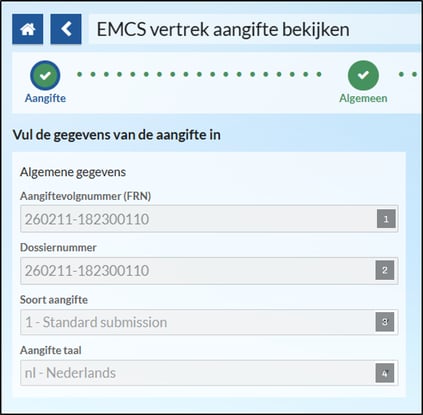
Path: declarationData
| Nr | JSON field | Type | Req. | Description |
| 1 | – | No JSON field. FRN. Generated by Shipment. Returned in the response as frn. |
||
| 2 | dossierNumber |
string(30) |
✓ | At the top of the request, outside the declaration: dossierNumber. The dossier name in Shipment, for example your order or delivery number. |
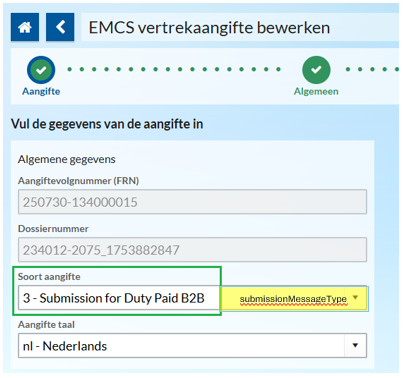
| 3 | submissionMessageType |
string(1) |
✓ | Type of submission message. Code list TC71. |
| 4 | declarationLanguage |
string(2) |
✓ | Language of the declaration. Code list BC12. |
Step 2: Algemeen (General)
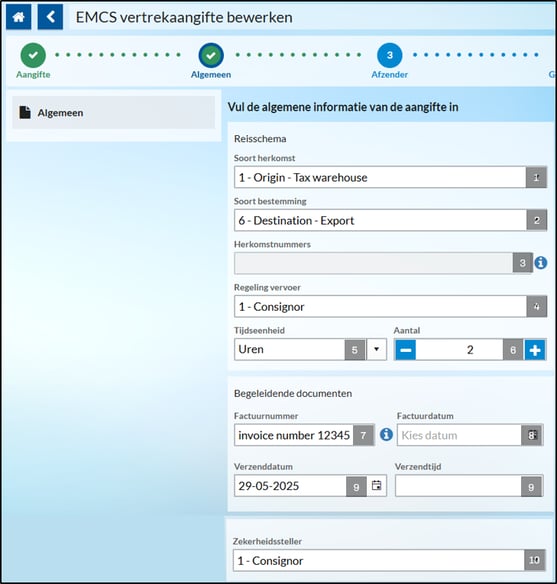
Algemeen
Path: declarationData
| Nr | JSON field | Type | Req. | Description |
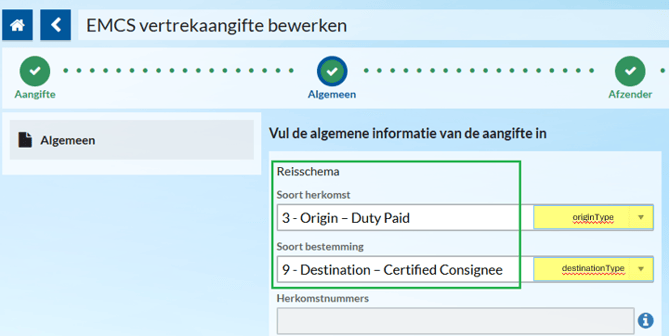
| 1 | originType |
string(1) |
Type of origin. Code list TC30. | |
| 2 | destinationType |
string(2) |
Type of destination. Code list TC32. | |
| 3 | originNumbers |
array of string |
Origin numbers, for example the MRN of the import declaration. | |
| 4 | transportArrangement |
string(1) |
Who arranges the transport. Code list TC70. | |
| 5 | journeyTimeUnit |
string(1) |
Unit of the journey time: H = hours, D = days. |
|
| 6 | journeyTimeAmount |
integer |
Journey time: 0–24 for hours, 0–92 for days. | |
| 7 | invoiceNumber |
string(35) |
Invoice number. | |
| 8 | invoiceDate |
datetime |
Invoice date. | |
| 9 | dateOfDispatch |
datetime |
Date of dispatch. | |
| – | timeOfDispatch |
datetime |
Time of dispatch. | |
| 10 | guarantorType |
string(4) |
Type of guarantor. Code list TC29. |
Zekerheidsteller
Path: declarationData.guarantorTraders[]
| Nr | JSON field | Type | Req. | Description |
| – | internalCode |
string |
Internal code in the address book. | |
| – | traderName |
string(182) |
Name. | |
| – | streetName |
string(65) |
Street. | |
| – | streetNumber |
string(11) |
House number. | |
| – | postcode |
string(10) |
Postal code. | |
| – | city |
string(50) |
City. | |
| – | country.code |
string |
✓ | Country code. Code list CL248. |
| – | country.name |
string |
✓ | Country name. |
| – | exciseNumber |
string |
Excise number. | |
| – | vatNumber |
string(14) |
VAT number. | |
| – | registeredConsignorExciseNumber |
string |
Excise number as registered consignor, saved in the address book. | |
| – | certifiedConsignorExciseNumber |
string |
Excise number as certified consignor, saved in the address book. | |
| – | registeredConsigneeExciseNumber |
string |
Excise number as registered consignee, saved in the address book. | |
| – | certifiedConsigneeExciseNumber |
string |
Excise number as certified consignee, saved in the address book. | |
| – | authorisedWarehouseKeeperExciseNumber |
string |
Excise number as authorised warehouse keeper, saved in the address book. |
Step 3: Afzender (Consignor)
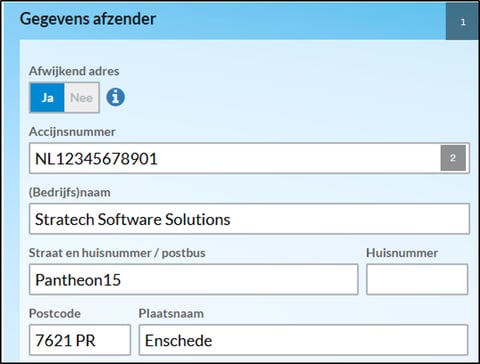
Path: consignorTrader
| Nr | JSON field | Type | Req. | Description |
| 1 | internalCode |
string |
Internal code of the consignor in the address book. | |
| 2 | exciseNumber |
string |
Excise number used for this declaration. | |
| – | traderName |
string(182) |
Name. | |
| – | streetName |
string(65) |
Street. | |
| – | streetNumber |
string(11) |
House number. | |
| – | postcode |
string(10) |
Postal code. | |
| – | city |
string(50) |
City. | |
| – | country.code |
string |
✓ | Country code. Code list CL248. |
| – | country.name |
string |
✓ | Country name. |
| – | registeredConsignorExciseNumber |
string |
Excise number as registered consignor, saved in the address book. | |
| – | certifiedConsignorExciseNumber |
string |
Excise number as certified consignor, saved in the address book. | |
| – | authorisedWarehouseKeeperExciseNumber |
string |
Excise number as authorised warehouse keeper, saved in the address book. |
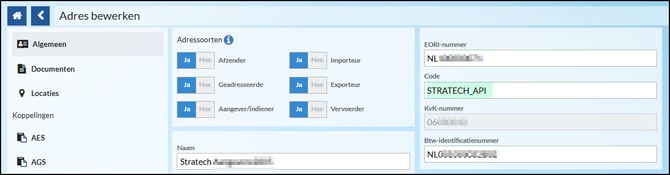
Shipment takes the name and address of the consignor from the address book. How the link works is in the article Customs, section Link to the address book (internalCode). The address fields are only needed when you do not use the address book.
Step 3: Afzender, Plaats van verzending (Place of dispatch)
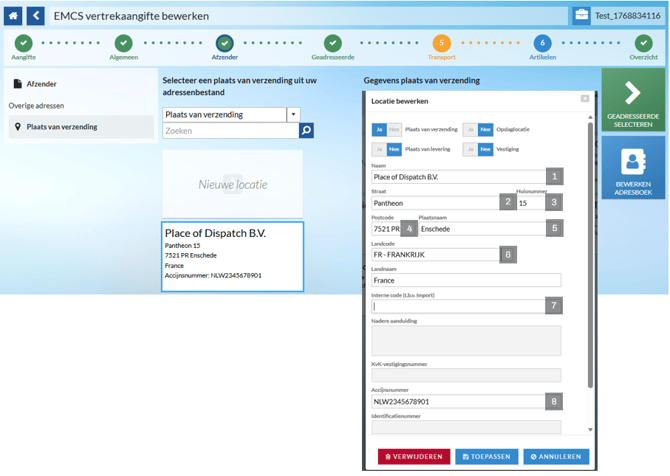
Path: placeOfDispatchTrader
| Nr | JSON field | Type | Req. | Description |
| 7 | internalCode |
string |
✓ | Internal code of the place of dispatch in the address book. |
| 1 | traderName |
string(182) |
Name. | |
| 2 | streetName |
string(65) |
Street. | |
| 3 | streetNumber |
string(11) |
House number. | |
| 4 | postcode |
string(10) |
Postal code. | |
| 5 | city |
string(50) |
City. | |
| 6 | country.code |
string |
✓ | Country code. Code list CL248. |
| 6 | country.name |
string |
✓ | Country name. |
| 8 | referenceOfTaxWarehouse |
string |
Excise number of the tax warehouse of dispatch. |
Step 4: Geadresseerde (Consignee)
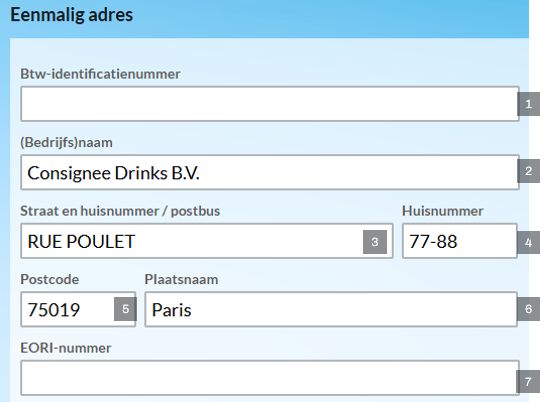
Path: consigneeTrader
| Nr | JSON field | Type | Req. | Description |
| – | internalCode |
string |
Internal code of the consignee in the address book. | |
| 1 | vatNumber |
string(16) |
VAT number. | |
| 2 | traderName |
string(182) |
Name. | |
| 3 | streetName |
string(65) |
Street. | |
| 4 | streetNumber |
string(11) |
House number. | |
| 5 | postcode |
string(10) |
Postal code. | |
| 6 | city |
string(50) |
City. | |
| – | country.code |
string |
✓ | Country code. Code list CL248. |
| – | country.name |
string |
✓ | Country name. |
| 7 | eoriNumber |
string |
EORI number. | |
| – | exciseNumber |
string |
Excise number used for this declaration. | |
| – | serialNumberOfCertificateOfExemption |
string(255) |
Serial number of the certificate of exemption. | |
| – | registeredConsigneeExciseNumber |
string |
Excise number as registered consignee, saved in the address book. | |
| – | certifiedConsigneeExciseNumber |
string |
Excise number as certified consignee, saved in the address book. | |
| – | authorisedWarehouseKeeperExciseNumber |
string |
Excise number as authorised warehouse keeper, saved in the address book. |
Step 4: Geadresseerde, Plaats van levering (Place of delivery)
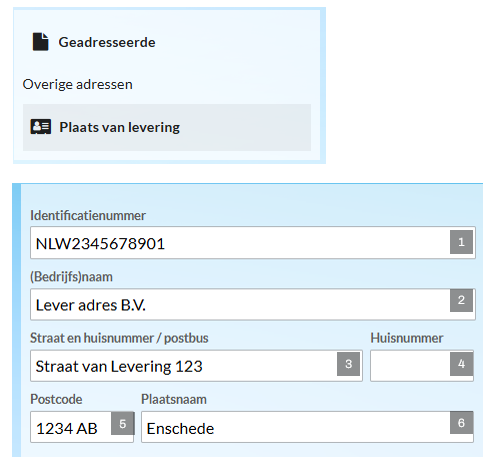
Path: deliveryPlaceTrader
| Nr | JSON field | Type | Req. | Description |
| – | internalCode |
string |
Internal code of the place of delivery in the address book. | |
| 1 | identificationNumber |
string(16) |
VAT number of the place of delivery. | |
| 2 | traderName |
string(182) |
Name. | |
| 3 | streetName |
string(65) |
Street. | |
| 4 | streetNumber |
string(11) |
House number. | |
| 5 | postcode |
string(10) |
Postal code. | |
| 6 | city |
string(50) |
City. | |
| – | country.code |
string |
✓ | Country code. Code list CL248. |
| – | country.name |
string |
✓ | Country name. |
| – | exciseNumber |
string |
Excise number of the place of delivery. |
Step 5: Transport
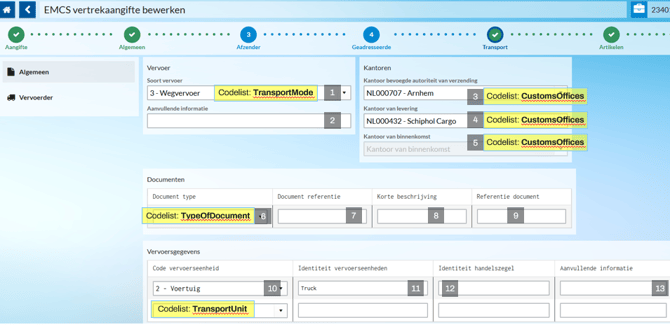
Vervoer
Path: declarationData.transportMode
| Nr | JSON field | Type | Req. | Description |
| 1 | transportModeCode |
string(2) |
Mode of transport. Code list BC67. | |
| 2 | complementaryInformation |
string(350) |
Additional information about the mode of transport. |
Kantoren
Path: declarationData
| Nr | JSON field | Type | Req. | Description |
| 3 | competentAuthorityDispatchOfficeReferenceNumber |
string(8) |
Office of the competent authority at dispatch. | |
| 4 | deliveryPlaceCustomsOfficeReferenceNumber |
string(8) |
Customs office at the place of delivery. | |
| 5 | dispatchImportOfficeReferenceNumber |
string(8) |
Customs office of import at dispatch. |
Documenten
Path: declarationData.documentCertificates[]
| Nr | JSON field | Type | Req. | Description |
| 6 | documentType |
string(4) |
Type of document. Code list BC106. | |
| 7 | documentReference |
string(35) |
Reference of the document. | |
| 8 | documentDescription |
string(350) |
Description of the document. | |
| 9 | referenceOfDocument |
string(350) |
Short reference of the document. |
Vervoerseenheden
Path: declarationData.transportDetails[]
| Nr | JSON field | Type | Req. | Description |
| 10 | transportUnitCode |
string(2) |
Type of transport unit. Code list BC35. | |
| 11 | identityOfTransportUnits |
string(35) |
Identity of the transport unit, for example the licence plate. | |
| 12 | commercialSealIdentification |
string(35) |
Commercial seal. | |
| – | sealInformation |
string(350) |
Information about the seal. | |
| 13 | complementaryInformation |
string(350) |
Additional information. |
Organisator vervoer
Path: transportArrangerTrader
| Nr | JSON field | Type | Req. | Description |
| – | internalCode |
string |
Internal code in the address book. | |
| – | traderName |
string(182) |
Name. | |
| – | streetName |
string(65) |
Street. | |
| – | streetNumber |
string(11) |
House number. | |
| – | postcode |
string(10) |
Postal code. | |
| – | city |
string(50) |
City. | |
| – | country.code |
string |
✓ | Country code. Code list CL248. |
| – | country.name |
string |
✓ | Country name. |
| – | vatNumber |
string(14) |
VAT number. |
Eerste vervoerder
Path: declarationData.firstTransporterTrader
| Nr | JSON field | Type | Req. | Description |
| – | internalCode |
string |
Internal code in the address book. | |
| – | traderName |
string(182) |
Name. | |
| – | streetName |
string(65) |
Street. | |
| – | streetNumber |
string(11) |
House number. | |
| – | postcode |
string(10) |
Postal code. | |
| – | city |
string(50) |
City. | |
| – | country.code |
string |
✓ | Country code. Code list CL248. |
| – | country.name |
string |
✓ | Country name. |
| – | vatNumber |
string(14) |
VAT number. |
Step 6: Artikelen (Goods items), part 1
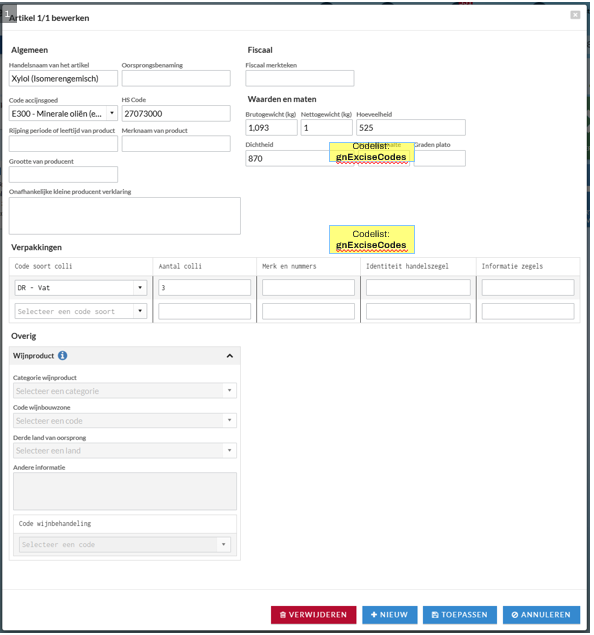
Path: declarationData.exciseProducts[]
| Nr | JSON field | Type | Req. | Description |
| – | sequenceNumber |
integer |
Sequence number of the excise product, starting at 1. | |
| 1 | description |
string(350) |
Description of the goods. | |
| 2 | designationOfOrigin |
string(350) |
Designation of origin. | |
| 3 | fiscalMark |
string(350) |
Fiscal mark. | |
| 4 | exciseProductCode |
string(4) |
Excise product code. Code list BC36. | |
| 5 | cnCode |
string(8) |
CN code. Code list BC37, or another value when the excise product code is S500. |
|
| 6 | maturationPeriodOrAgeOfProducts |
string(350) |
Maturation period or age of the products. | |
| – | brandNameOfProducts |
string(350) |
Brand name. | |
| – | sizeOfProducer |
integer |
Size of the producer. | |
| – | independentSmallProducersDeclaration |
string(350) |
Declaration of an independent small producer. | |
| – | quantity |
number |
Quantity. | |
| – | grossMass |
number |
Gross mass in kg. | |
| – | netMass |
number |
Net mass in kg. | |
| – | density |
number |
Density. | |
| – | alcoholicStrengthByVolumeInPercentage |
number |
Alcoholic strength by volume (%). | |
| – | degreePlato |
number |
Degree Plato (beer). |
Step 6: Artikelen (Goods items), part 2
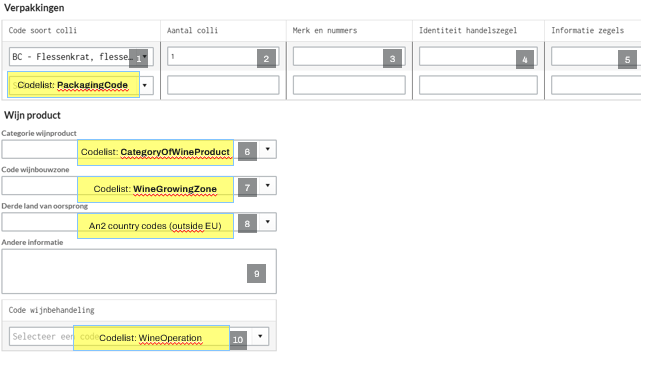
Verpakking
Path: declarationData.exciseProducts[].packaging[]
| Nr | JSON field | Type | Req. | Description |
| 1 | kindOfPackages |
string(2) |
Kind of packages. Code list BC17. | |
| 2 | numberOfPackages |
integer |
Number of packages. | |
| 3 | shippingMarks |
string(999) |
Shipping marks. | |
| 4 | commercialSealIdentification |
string(35) |
Commercial seal. | |
| 5 | sealInformation |
string(350) |
Information about the seal. |
Wijnproduct
Path: declarationData.exciseProducts[].wineProduct
| Nr | JSON field | Type | Req. | Description |
| 6 | wineProductCategory |
string(1) |
Wine product category. Code list TC38. | |
| 7 | – | No JSON field. Maturation period or age: same field as nr 6 in part 1. There is no separate field on the wine product. | ||
| – | wineGrowingZoneCode |
string(2) |
Wine growing zone. Code list BC40. | |
| 8 | thirdCountryOfOrigin |
string(2) |
Third country of origin. | |
| 9 | otherInformation |
string(350) |
Other information. | |
| 10 | wineOperation[].wineOperationCode |
string(2) |
Wine operation code. Code list BC41. |
Duty paid (e-VAD)
In the duty paid B2B scenario (in Dutch: veraccijnsde aangifte) Shipment creates an e-VAD instead of an e-AD. The e-VAD is a simplified e-AD for excise goods on which excise duty has already been paid in the country of dispatch, so not under duty suspension. It is used when such goods are sent to another EU Member State, once or regularly. The consignor must hold a (temporary) certified consignor authorisation. The example file for this scenario is in Downloads.
Response
The response has one result per declaration in emcsDepartureDeclarationResults: applicationReferenceId, isSaved, isSubmitted, errors and frn. HTTP 200 does not mean every declaration is valid: always check isSaved and errors. All HTTP codes are in the article Payload rules.
Points to note
- Code list fields must contain the exact code from the EMCS code lists (see Downloads).
- Line breaks are not allowed in customs messages.