A CZZ request is a request for a phytosanitary export certificate for seeds (sector CZZ, in Dutch: zaaizaden). Shipment validates the request and sends it to e-CertNL of the NVWA. This article follows the screens of the request in Shipment. For each screen you see which JSON field fills which field.
How sectors, additional documents and updates work in general is in the article NVWA Overview.
| Endpoint | POST /erpservices/ImportDossier |
| Where in the request | nvwaExportCertificateRequests (array) |
| One request | One dossier, maximum 10 requests per request in total. |
DeclarationType in status updates |
12 |
| Reference in the response | None. e-CertNL assigns a consignmentId, which comes in the status updates. |
Downloads
Endpoint
POST {base-url}/erpservices/ImportDossier
Replace {base-url} with the URL of your product and environment:
| Product and environment | {base-url} |
| Stratech Shipment – Test | https://test-{prefix}.shipment-stratech.nl |
| Stratech Shipment – Production | https://{prefix}.stratechshipment.nl |
| Beurtvaartadres ShipmentManager – Test | https://{prefix}.accshipmentmanager.eu |
| Beurtvaartadres ShipmentManager – Production | https://{prefix}.shipmentmanager.eu |
Structure
The request is a dossier with the certificate request in the array nvwaExportCertificateRequests. The paths in the tables below start at one item of that array.
How to read the tables
The column Req. shows what the API requires: ✓ means the request is rejected without the field. Which other fields are needed depends on the request; Shipment checks that when it validates the request. The column Nr is the number in the screenshot. Fields with "–" have no number in the screenshot.
Control fields
| Field in Shipment | JSON field | Type | Req. | Description |
| – | applicationReferenceId |
string |
✓ | Your unique reference for this request. Never reuse it, not even when you send the same dataset again. A duplicate returns HTTP 409. |
| – | doSubmitWhenValid |
boolean |
Default false. true: Shipment sends the request to e-CertNL as soon as it is valid. Upload additional documents first. |
|
| – | doNotSaveWhenInvalid |
boolean |
Default false: an invalid request is saved, so a user can complete it in Shipment. true: an invalid request is not saved and you get the errors back. |
|
| – | fullUserNameOfSubmitter |
string(64) |
Full name of the user who submits the request. |
Step 1: Aanvraag (Request)
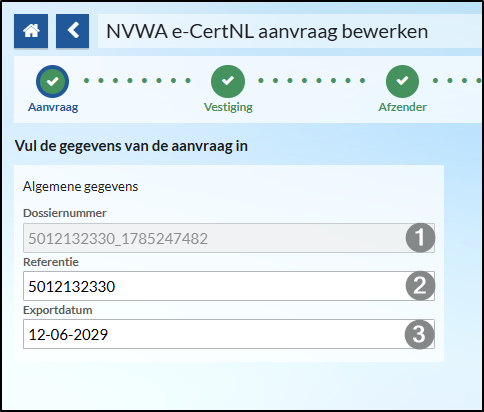
Path: exportConsignment
| Nr | JSON field | Type | Req. | Description |
| 1 | dossierNumber |
string(30) |
✓ | At the top of the request, outside the request: dossierNumber. The dossier name in Shipment, for example your order or delivery number. |
| 2 | referenceNumber |
string(100) |
Your reference for this request, for your own administration. | |
| 3 | exportExitDateTime |
datetime |
✓ | Expiry date of the inspection. After this date, e-CertNL no longer handles the request. It is also the reference date for the export characteristics. |
Step 2: Vestiging (Branch)
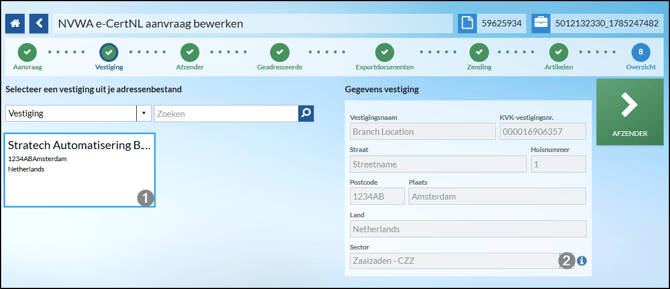
Path: exportConsignment
| Nr | JSON field | Type | Req. | Description |
| 1 | branchLocationInternalCode |
string |
Internal code of the location of your branch in Shipment, with its address and the e-CertNL account details. Set it up in Shipment under Adresboek (Address book) > Adres bewerken (Edit address) > Locaties (Locations) > Interne code (Internal code). Shipment uses it to validate the request and to send it to the NVWA. | |
| 2 | sectorCode |
string |
✓ | The sector. For seeds: CZZ. Values: CAT, CFA, CZZ, CDV, CEV, CVA, CVI, CVV, CZU. |
Step 3: Afzender (Consignor)
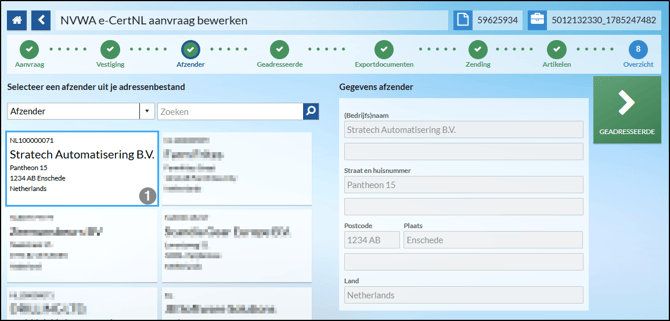
Path: exportConsignment.consignor
| Nr | JSON field | Type | Req. | Description |
| 1 | internalCode |
string(450) |
✓ | Internal code of the consignor in the address book. Shipment takes the name and address from the address book. |
| – | address.name |
string(255) |
✓ | Name. |
| – | address.nameAddition |
string(255) |
Extra name line, printed on a second line. | |
| – | address.streetAndNumber |
string(255) |
✓ | Street and house number. |
| – | address.streetAndNumberAddition |
string(255) |
Extra address line after the street, for example a floor, building or department. | |
| – | address.zipCode |
string(12) |
Postal code. | |
| – | address.city |
string(70) |
✓ | City. |
| – | address.extraAddressLine |
string(255) |
Extra address line. It is the last line of the address, after the postal code. | |
| – | address.country.code |
string(2) |
✓ | Country code. Code list CL248. |
| – | address.country.name |
string(70) |
✓ | Country name. |
Link the consignor to the address book in Shipment with the same internal code:
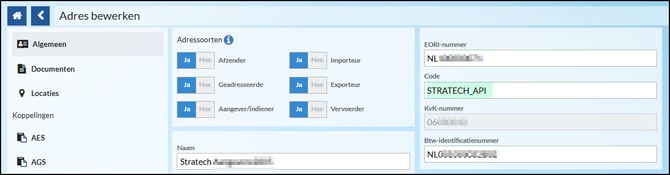
"consignor": { "internalCode": "STRATECH_API" }
Send either internalCode or the address fields. If you send both, Shipment updates the address with that internal code with the address fields you send. See the article Payload rules, section Address book.
Step 4: Geadresseerde (Consignee)
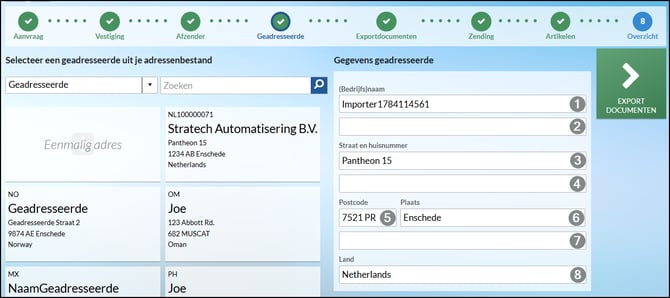
Path: exportConsignment.consignee
| Nr | JSON field | Type | Req. | Description |
| – | internalCode |
string(450) |
Internal code of the consignee in the address book. Use it or the address fields. If you send both, Shipment updates the address with that internal code with the address fields you send. | |
| 1 | address.name |
string(255) |
✓ | Name. |
| 2 | address.nameAddition |
string(255) |
Extra name line, printed on a second line. | |
| 3 | address.streetAndNumber |
string(255) |
✓ | Street and house number. |
| 4 | address.streetAndNumberAddition |
string(255) |
Extra address line after the street, for example a floor, building or department. | |
| 5 | address.zipCode |
string(12) |
Postal code. | |
| 6 | address.city |
string(70) |
✓ | City. |
| 7 | address.extraAddressLine |
string(255) |
Extra address line. It is the last line of the address, after the postal code. | |
| 8a | address.country.code |
string(2) |
✓ | Country code. Code list CL248. |
| 8b | address.country.name |
string(70) |
✓ | Country name. |
Step 5: Exportdocumenten (Export documents)
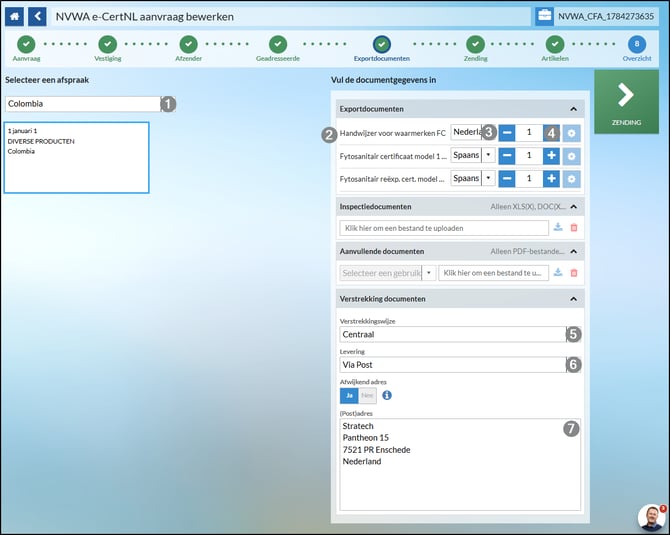
Agreement
Path: exportConsignment
| Nr | JSON field | Type | Req. | Description |
| 1 | destinationCountryCode |
string(2) |
Country of destination: the country outside the EU with which the NVWA has agreements on the requirements for the product. ISO 3166-1 alpha-2. | |
| – | agreementNumber |
integer |
Number of the agreement. Shipment finds the agreement from the sector, the country of destination and the export date. Only needed when that gives more than one agreement. | |
| – | provinceName |
string |
Province. Only used in rare cases, to find the right agreement. | |
| – | viaTransitCountryInEU |
boolean |
Set to true when the consignment passes through another EU country. |
Certificate
Path: exportConsignment.exportCertificates[]
| Nr | JSON field | Type | Req. | Description |
| 2 | certificateName |
string(70) |
✓ | Name of the certificate, exactly as in e-CertNL. See Certificates for seeds below. |
| 3 | language |
string(4) |
✓ | Language of the certificate: EN, FR, NL, PT or ES. For a certificate in two languages, combine the codes, for example ESEN. The language per country of destination is in the article Reference tables. |
| 4 | numberOfCopies |
integer |
✓ | Number of copies, 1 to 9. |
| – | nonCertificateLevelCharacteristics |
string[] |
List of typeCode values from applicableCertificateCharacteristics of the consignment that are printed on this certificate. |
|
| – | certificateLevelCharacteristics[].name |
string(70) |
✓ | Name of a characteristic that is only printed on this certificate. |
| – | certificateLevelCharacteristics[].value |
string(175) |
✓ | Value of that characteristic. |
| – | regulatoryProcedures[].content |
string(60) |
✓ | Name of a statement (in Dutch: verklaring) that is printed on the certificate. |
Handling
Path: exportConsignment.exportCertificateHandlingInstructions
| Nr | JSON field | Type | Req. | Description |
| 5 | certificateMethodOfProvisionCode |
string |
How the certificate is provided. Values: NietVerstrekken, Lokaal, Centraal. |
|
| 6 | certificateShippingTypeCode |
string |
How the printed certificates reach you: collect them or by post. Values: Afhalen, ViaPost. |
|
| 7 | certificateHandlingAddress |
string(2000) |
Postal address for the certificates, when they are sent by post. |
Additional documents
Path: exportConsignment.additionalDocuments[]
| Nr | JSON field | Type | Req. | Description |
| – | fileName |
string(260) |
✓ | File name with extension, exactly the same as the file you upload. The upload fails if the names differ. See the article NVWA Overview, section Additional documents. |
| – | intendedUse |
string |
✓ | Type of document. Values: InspectieDocument, ImportCertificaat, Annexdocument, AnnexDocumentMetHandtekening, AnnexDocumentZonderHandtekening, OverigDocument. |
Certificates for seeds
The certificate name in certificateName must match the name in e-CertNL exactly. A different spelling or translation is rejected.
Which certificates you request, and how many, differs per sector, customer and agreement. Shipment fills in the certificates and numbers in advance, based on the list of agreements from the NVWA that is loaded in Shipment. You can change these values in the request. The table shows the certificates for seeds.
| certificateName | Use it for |
| Fytosanitair certificaat model 1 | Seed lots of Dutch or EU origin. |
| Fytosanitair reëxport certificaat model 20 | Seed lots of non-EU origin that are forwarded from the Netherlands to another country outside the EU. |
| Handwijzer voor waarmerken FC zaaizaden | The NVWA guide for endorsing phytosanitary certificates for seeds. It is used in the sample file. |
Step 6: Zending (Consignment)
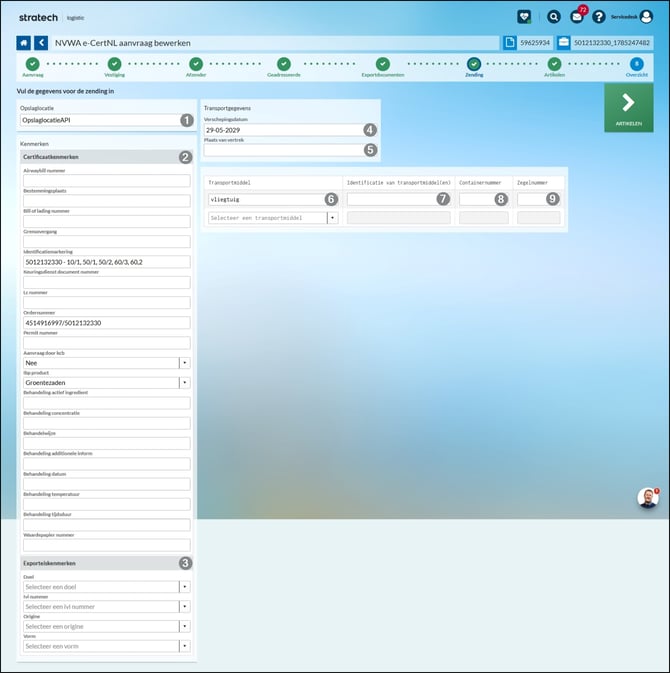
Location
Path: exportConsignment
| Nr | JSON field | Type | Req. | Description |
| 1 | warehouseLocationInternalCode |
string |
Internal code of the inspection location in Shipment, under Adresboek (Address book) > Adres bewerken (Edit address) > Locaties (Locations) > Interne code (Internal code). Shipment adds its address to the request. | |
| – | warehouseLocationAdditionalDetails |
string(2000) |
Extra information about the inspection location. |
Characteristics
Path: exportConsignment
| Nr | JSON field | Type | Req. | Description |
| 2a | applicableCertificateCharacteristics[].typeCode |
string(70) |
✓ | Type of the characteristic. See Consignment characteristics below. |
| 2b | applicableCertificateCharacteristics[].valueCode |
string(240) |
✓ | Value of the characteristic. Free text, except for AANVRAAG_DOOR_KCB and IBP_PRODUCT. |
| 3a | applicableExportCharacteristics[].typeCode |
string(70) |
✓ | Type of the export characteristic. |
| 3b | applicableExportCharacteristics[].valueCode |
string(240) |
✓ | Value of the export characteristic. |
Departure
Path: exportConsignment.loadingEvent
| Nr | JSON field | Type | Req. | Description |
| 4 | occurenceDateTime |
datetime |
Date of departure of the goods. If filled in, this date is printed on the certificate instead of exportExitDateTime. It is also the date on which the certificate is certified. |
|
| 5 | occurenceLocationCityName |
string(70) |
City of departure. |
Transport
Path: exportConsignment.transportEquipment[]
| Nr | JSON field | Type | Req. | Description |
| 6 | transportType |
string(500) |
✓ | Type of transport. e-CertNL translates these values into the language of the certificate: binnenvaartschip, boot, handbagage, koerier, passagier, post, trein, vliegtuig, vrachtauto, vrachtwagen, wegvervoer, zeeschip. Other values are not translated. |
| 7 | transportIdentification |
string(500) |
Identification of the means of transport, for example a licence plate or flight number. | |
| 8 | containerNumber |
string(500) |
Container number. | |
| 9 | affixedSeal |
string(499) |
Seal number. |
Consignment characteristics
Send these in exportConsignment.applicableCertificateCharacteristics. The value is free text, except where the table lists values.
| Label in Shipment | typeCode | Values |
| Aanvraag door kcb | AANVRAAG_DOOR_KCB |
Ja or Nee |
| Airwaybill nummer | AIRWAYBILL_NUMMER |
Free text |
| Behandeling actief ingredient | BEHANDELING_ACTIEF_INGREDIENT |
Free text |
| Behandeling additionele informatie | BEHANDELING_ADDITIONELE_INFORMATIE |
Free text |
| Behandeling concentratie | BEHANDELING_CONCENTRATIE |
Free text |
| Behandeling datum | BEHANDELING_DATUM |
Free text |
| Behandeling temperatuur | BEHANDELING_TEMPERATUUR |
Free text |
| Behandeling tijdsduur | BEHANDELING_TIJDSDUUR |
Free text |
| Behandelwijze | BEHANDELWIJZE |
Free text |
| Bestemmingsplaats | BESTEMMINGSPLAATS |
Free text |
| Bill of lading nummer | BILL_OF_LADING_NUMMER |
Free text |
| Grensovergang | GRENSOVERGANG |
Free text |
| Ibp product | IBP_PRODUCT |
Zaden voor labonderzoek, Groentezaden, Bloemzaden, Overige zaden or Waarmerken replacement |
| Identificatiemarkering | IDENTIFICATIEMARKERING |
Free text |
| Keuringsdienst document nummer | KEURINGSDIENST_DOCUMENT_NUMMER |
Free text |
| Lc nummer | LC_NUMMER |
Free text |
| Ordernummer | ORDERNUMMER |
Free text |
| Permit nummer | PERMIT_NUMMER |
Free text |
| Waardepapier nummer | WAARDEPAPIER_NUMMER |
Free text |
Step 7: Artikelen (Goods items), overview
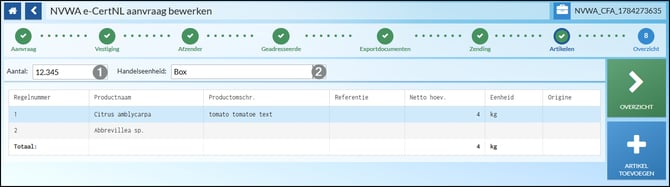
Path: exportConsignment.chargeableUnit
| Nr | JSON field | Type | Req. | Description |
| 1 | quantity |
integer |
Number of packages of the consignment. | |
| 2 | unitCode |
string(100) |
Package type code (UN/ECE Recommendation 21), exactly as in e-CertNL. Examples: AM = Ampoule, non-protected; CG = Cage; BX = Box; CH = Chest; CE = Creel. |
Step 7: Artikelen (Goods items), general
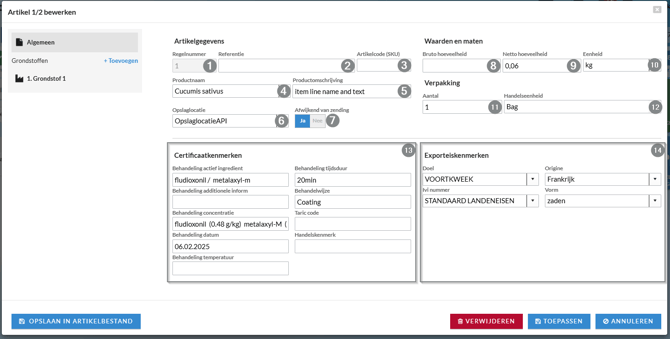
Goods item
Path: exportConsignment.includedTradeLineItems[]
| Nr | JSON field | Type | Req. | Description |
| 1 | – | No JSON field. Shipment numbers the items in the order of the array. | ||
| 2 | descriptionText |
string(120) |
Your reference for the item. It must be unique within the request. | |
| 3 | stockKeepingUnit |
string(80) |
Not sent to e-CertNL. Shipment uses it to find a goods item template with this code. Values from the template only fill fields of the item that are empty. On an update, only new items are filled from the template. The branch and the sector decide which template is used. | |
| – | productionBatchId |
string(100) |
Reference of the batch. | |
| 4 | applicableProduct.productName |
string(120) |
✓ | Name of the product exactly as in e-CertNL. Product names in e-CertNL contain no line breaks. |
| 5 | applicableProduct.descriptionText |
string(120) |
Description of the product, printed on the certificate. | |
| 6 | warehouseLocationInternalCode |
string |
Internal code of the storage location of the item, set up in Shipment like the inspection location in step 6. |
Quantity
Path: exportConsignment.includedTradeLineItems[]
| Nr | JSON field | Type | Req. | Description |
| 8 | measure.grossVolume |
number |
Gross quantity. | |
| 9 | measure.netVolume |
number |
Net quantity. Not more than the gross quantity. | |
| 10 | measure.unitCode |
string |
Unit of the quantity. Values: Stuks, gr, kg, mt, ltr. |
|
| 11 | chargeableUnit.quantity |
integer |
Number of packages. | |
| 12 | chargeableUnit.unitCode |
string(100) |
Package type code (UN/ECE Recommendation 21), exactly as in e-CertNL. Examples: AM = Ampoule, non-protected; CG = Cage; BX = Box; CH = Chest; CE = Creel. |
Characteristics
Path: exportConsignment.includedTradeLineItems[]
| Nr | JSON field | Type | Req. | Description |
| 13a | applicableCertificateCharacteristics[].typeCode |
string(70) |
✓ | Type of the characteristic. See Item characteristics below. |
| 13b | applicableCertificateCharacteristics[].valueCode |
string(240) |
✓ | Value of the characteristic. |
| 14a | applicableExportCharacteristics[].typeCode |
string(70) |
✓ | Type of the export characteristic: DOEL, IVI_NUMMER, ORIGINE or VORM. |
| 14b | applicableExportCharacteristics[].valueCode |
string(240) |
✓ | Value of the export characteristic. |
Item characteristics
Send these per item in includedTradeLineItems[].applicableCertificateCharacteristics and includedTradeLineItems[].applicableExportCharacteristics.
| Label in Shipment | typeCode | Type |
| Behandeling actief ingredient | BEHANDELING_ACTIEF_INGREDIENT |
Certificate characteristic |
| Behandeling additionele informatie | BEHANDELING_ADDITIONELE_INFORMATIE |
Certificate characteristic |
| Behandeling concentratie | BEHANDELING_CONCENTRATIE |
Certificate characteristic |
| Behandeling datum | BEHANDELING_DATUM |
Certificate characteristic |
| Behandeling temperatuur | BEHANDELING_TEMPERATUUR |
Certificate characteristic |
| Behandeling tijdsduur | BEHANDELING_TIJDSDUUR |
Certificate characteristic |
| Behandelwijze | BEHANDELWIJZE |
Certificate characteristic |
| Handelskenmerk | HANDELSKENMERK |
Certificate characteristic |
| Taric code | TARIC_CODE |
Certificate characteristic |
| Doel | DOEL |
Export characteristic, for example VOORTKWEEK |
| Ivi nummer | IVI_NUMMER |
Export characteristic, for example STANDAARD LANDENEISEN |
| Origine | ORIGINE |
Export characteristic: the Dutch country name, for example Frankrijk. See the article Reference tables. |
| Vorm | VORM |
Export characteristic, for example zaden |
Step 7: Artikelen (Goods items), raw materials
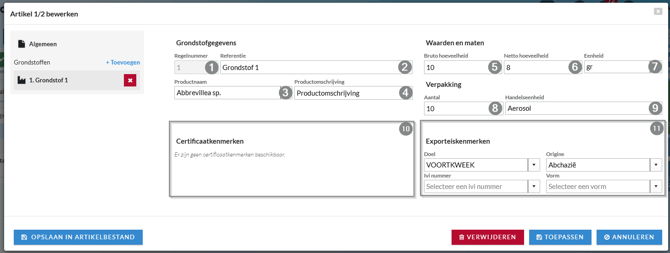
Raw material
Path: exportConsignment.includedTradeLineItems[].materials[]
| Nr | JSON field | Type | Req. | Description |
| 1 | – | No JSON field. Shipment numbers the raw materials in the order of the array. | ||
| 2 | descriptionText |
string(100) |
Description of the raw material. | |
| 3 | applicableProduct.productName |
string(120) |
✓ | Name of the product exactly as in e-CertNL. |
| – | applicableProduct.descriptionText |
string(70) |
Description of the product, printed on the certificate. |
Quantity
Path: exportConsignment.includedTradeLineItems[].materials[]
| Nr | JSON field | Type | Req. | Description |
| 5 | measure.grossVolume |
number |
Gross quantity. | |
| 6 | measure.netVolume |
number |
Net quantity. Not more than the gross quantity. | |
| 7 | measure.unitCode |
string |
Unit of the quantity. Values: Stuks, gr, kg, mt, ltr. |
|
| 8 | chargeableUnit.quantity |
integer |
Number of packages. | |
| 9 | chargeableUnit.unitCode |
string(100) |
Package type code (UN/ECE Recommendation 21), exactly as in e-CertNL. Examples: AM = Ampoule, non-protected; CG = Cage; BX = Box; CH = Chest; CE = Creel. |
Characteristics
Path: exportConsignment.includedTradeLineItems[].materials[]
| Nr | JSON field | Type | Req. | Description |
| 10a | applicableCertificateCharacteristics[].typeCode |
string(70) |
✓ | Type of the characteristic. |
| 10b | applicableCertificateCharacteristics[].valueCode |
string(240) |
✓ | Value of the characteristic. |
| 11a | applicableProcessCharacteristics[].typeCode |
string(70) |
✓ | Type of the process characteristic. |
| 11b | applicableProcessCharacteristics[].valueCode |
string(240) |
✓ | Value of the process characteristic. |
| – | applicableExportCharacteristics[].typeCode |
string(70) |
✓ | Type of the export characteristic. |
| – | applicableExportCharacteristics[].valueCode |
string(240) |
✓ | Value of the export characteristic. |
Response
The response has one result per request in nvwaExportResults: applicationReferenceId, isSaved, isSubmitted, errors. HTTP 200 does not mean every request is valid: always check isSaved and errors. All HTTP codes are in the article Payload rules. e-CertNL assigns a consignmentId after submission. You receive it in the status updates (module Webhook).
Points to note
- Write field names exactly as in the tables. The names of the fields are camelCase, for example
address,nameandcountry.code, notAddressorName. This is only about the field names: values can contain spaces and capitals, for example"name": "Stratech Seeds B.V.". - Numbers are numbers. Send
netVolume,quantityandnumberOfCopieswithout quotes. - Leave out empty fields and lists. For example, don't send
transportIdentification: "". - Codes must match e-CertNL exactly: certificate names, product names, package type codes and characteristic values.
- Mixed products: raw materials go in
materialsunder the item they belong to. - Other sectors: the specification has more fields that seed requests do not use, such as approvals, producer, packer, batches, date ranges and the fields for dairy and fish. They are in the article NVWA Overview, section Field reference.