A Portbase MID notification (message M2400) reports a customs document to Portbase for the goods at a container or ferry terminal. This article follows the screen of the notification in Shipment. For each field you see which JSON field fills it.
How Portbase MED and MID work in general is in the article Port notifications Overview.
| Endpoint | POST /erpservices/ImportDossier |
| Where in the request | portbaseMidNotifications (array) |
| One request | One dossier, maximum 10 messages per request in total. |
DeclarationType in status updates |
17 |
| Reference in the response | None. The result has no reference number. |
Downloads
Endpoint
POST {base-url}/erpservices/ImportDossier
Replace {base-url} with the URL of your product and environment:
| Product and environment | {base-url} |
| Stratech Shipment – Test | https://test-{prefix}.shipment-stratech.nl |
| Stratech Shipment – Production | https://{prefix}.stratechshipment.nl |
| Beurtvaartadres ShipmentManager – Test | https://{prefix}.accshipmentmanager.eu |
| Beurtvaartadres ShipmentManager – Production | https://{prefix}.shipmentmanager.eu |
Structure
The request is a dossier with the notification in the array portbaseMidNotifications. The paths in the tables below start at one item of that array.
How to read the tables
The column Req. shows what the API requires: ✓ means the request is rejected without the field. Which other fields are needed depends on the message; Shipment checks that when it validates the message. The column Field in Shipment shows the section and the label on the screen, in Dutch with the English in parentheses.
Control fields
| Field in Shipment | JSON field | Type | Req. | Description |
| – | applicationReferenceId |
string |
✓ | Your unique reference for this notification. Never reuse it, not even when you send the same dataset again. A duplicate returns HTTP 409. |
| – | doSubmitWhenValid |
boolean |
Default false. true: Shipment sends the notification to Portbase as soon as it is valid. |
|
| – | doNotSaveWhenInvalid |
boolean |
Default false: an invalid notification is saved, so a user can complete it in Shipment. true: an invalid notification is not saved and you get the errors back. |
|
| – | fullUserNameOfSubmitter |
string(64) |
Full name of the user who submits the notification. |
Melding (Notification)
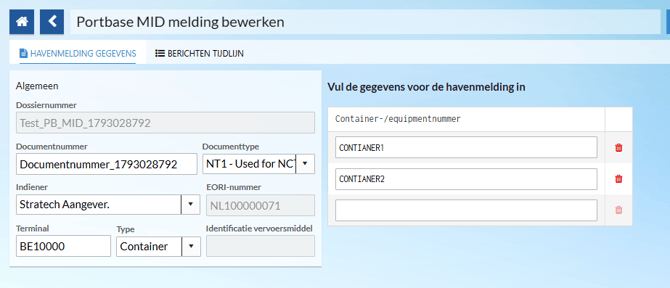
Path: notificationData
| Field in Shipment | JSON field | Type | Req. | Description |
| Algemeen (General) > Dossiernummer (Dossier number) | dossierNumber |
string(30) |
✓ | At the top of the request, outside the notification: dossierNumber. The dossier name in Shipment, for example your order or delivery number. |
| Algemeen (General) > Documentnummer (Document number) | documentNumber |
string(35) |
✓ | Number of the document the notification is about, for example the MRN. |
| Algemeen (General) > Documenttype (Document type) | documentType |
string(3) |
✓ | Type of the document: NT1, MRN, IM4, ICT, FWV, IM7, PIE, NAR, ENL, RNL, BXI, IAI, IAE, REN or ZWX. |
| Algemeen (General) > Indiener (Submitter) | submitter.internalCode |
string(450) |
Internal code of the submitter in the address book. | |
| Algemeen (General) > EORI-nummer (EORI number) | submitter.eoriNumber |
string(35) |
EORI number of the submitter. If you fill it in, Shipment ignores internalCode. |
|
| Algemeen (General) > Terminal | terminalIdentifier |
string(25) |
Identification of the terminal. | |
| Algemeen (General) > Type | terminalType |
string(3) |
Type of terminal: CON = container, FER = ferry. |
|
| Algemeen (General) > Identificatie vervoermiddel (Means of transport) | shipmentIdentifier |
string(17) |
Identification of the shipment. Only for terminal type FER. |
|
| Havenmelding (Port notification) > Container-/equipmentnummer (Container/equipment number) | equipment[].equipmentNumber |
string(17) |
✓ | Container or equipment number, one entry per container. Only for terminal type CON. |
Response
The response has one result per notification in portbaseMidNotificationResults: applicationReferenceId, isSaved, isSubmitted, errors. HTTP 200 does not mean every notification is valid: always check isSaved and errors. All HTTP codes are in the article Payload rules.
Points to note
- Fill in
terminalType:CONneeds the containers inequipment,FERneedsshipmentIdentifier. - Use the same
dossierNumberas the customs declaration the notification belongs to.