Shipment can send updates to your platform with a POST request to a URL you configure (a webhook). That way you receive the MRN, errors and inspections, and generated documents, without logging in to Shipment.
Optional: Status updates are optional and available for all modules except Chamber of Commerce. They require the right modules in your Shipment subscription. Not sure whether you have them? Contact Stratech.
Status updates work the same in Stratech Shipment and Beurtvaartadres ShipmentManager, whichever package you have.
Without status updates, you follow the status and the MRN of your declarations in Shipment itself.
Two kinds of updates
| Update | Sent when |
| Status update | The status of a declaration or document changes. |
| Document update | A document is generated or updated for a declaration. |
Each kind has its own URL: the Status callback URL for status updates and the Document callback URL for document updates. You set both in the same screen.
Statuses per flow
The statuses you receive match the flow or document:
- Documents such as the CMR: you receive an update when the document is saved, for example status
10(Draft) after you send a CMR through the API. - DMS declarations: you receive a status for every step the declaration goes through, from submission to Customs until release or exit.
Not every status is important or requires an action from your users. Decide which statuses you show in your ERP or source system, and ignore the rest. See Which statuses to process below.
Set up your callback URL
- Log in to Stratech Shipment or Beurtvaartadres ShipmentManager with an Administrator account.
- Click Beheer > Instellingen (Management > Settings), then ERP Koppeling (ERP integration).
- Enter your Status callback URL and, if you want to receive document updates, your Document callback URL.
- Set the security options (see below) and click Toepassen (Apply).
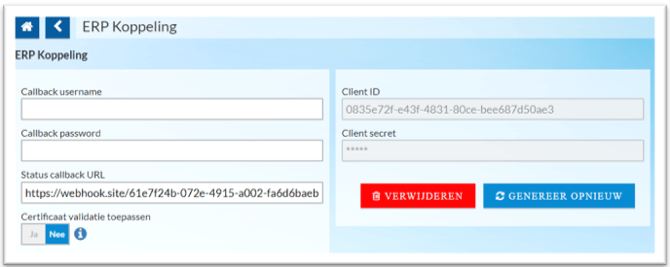
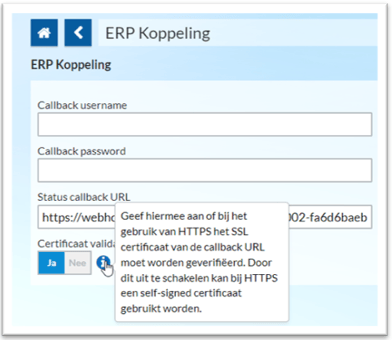
Security options:
Requirements for your endpoint
| Item | Requirement |
| Method | POST |
| Format | JSON. Read the fields you need and ignore fields you don\'t recognise. New fields can be added in a later version, so don\'t validate the update against a fixed schema. |
| Response | Return HTTP 200 when you have received the update. |
| Authentication | Basic authentication (username and password) and/or certificate validation. |
| Certificate | If certificate validation is set to No, Shipment also accepts self-signed certificates. |
| Firewall | If you use IP whitelisting, allow incoming requests from 20.61.240.121. [VERIFY: same IP address for Test and Production?] |
Verify the signature
Shipment signs its updates according to RFC 9421 (HTTP Message Signatures). You can verify that an update really comes from Shipment with the public certificate:
GET {base-url}/erpservices/Certificates
Replace {base-url} with the URL of your product and environment:
| Product and environment | {base-url} |
| Stratech Shipment – Test | https://test-{prefix}.shipment-stratech.nl |
| Stratech Shipment – Production | https://{prefix}.stratechshipment.nl |
| Beurtvaartadres ShipmentManager – Test | https://{prefix}.accshipmentmanager.eu |
| Beurtvaartadres ShipmentManager – Production | https://{prefix}.shipmentmanager.eu |
The response is an X.509 certificate. [TO DO: which signature headers are sent, and an example of the verification.]
Failed deliveries
If your endpoint returns a 4xx or 5xx code, or can't be reached, Shipment offers the update again later. Shipment retries a failed update up to 36 times, spread over about 7 days. For example: first attempt on 17 November at 08:20, last retry on 24 November at 11:41 (both CET). After the last retry Shipment stops sending that update, so make sure your endpoint is available again within that period.
Status update: fields
Example of a status update for a CMR sent through the API:
{
  "ApplicationReferenceId": "Test_CMR_1795512086",
  "DossierNumber": "Test_CMR_1795512086",
  "Status": 10,
  "SubmissionType": null,
  "DeclarationType": 9,
  "Frn": null,
  "Mrn": null,
  "Arc": null,
  "ConsignmentId": null,
  "StatusChangeTime": "2026-11-24T09:21:26.5634318+00:00"
}
The field names in a status update start with a capital letter. Fields that do not apply to the flow are null.
| Field | Description |
ApplicationReferenceId |
The reference you sent with the declaration. Use it to find the declaration in your platform. |
DossierNumber |
The dossier the declaration belongs to. |
Status |
The new status. See the article Status list. |
SubmissionType |
The type of message sent to or received from Customs, for example IE515 (export declaration). |
DeclarationType |
The type of declaration or document, for example DMS Export or 9 for a CMR. |
Frn |
Functional reference number of the declaration. |
Mrn |
Movement reference number (DMS, DVA, Transit). |
Arc |
Administrative reference code (EMCS). |
ConsignmentId |
ID assigned by e-CertNL (NVWA). |
StatusChangeTime |
When the status changed. |
Which statuses to process
You don't need to process every status. Many statuses are informative and need no action from your users. This is the recommended minimum for DMS declarations:
| Status | Name | Recommended action |
| 3 | Cleared (final release, DMS 4.0) | Store the MRN |
| 4 | ReleaseOfGoods (provisional release, DMS 4.0) | Store the MRN |
| 5 | ReleaseForEIDR (DMS 4.1) | Store the MRN |
| 28 | ExportNotification (exit of goods confirmed) | Optional: close the shipment |
| 23 | FunctionalRejection | Show a warning, check the rejection code |
| 24 | ControlNotificationDocuments | Show a warning: document check |
| 25 | ControlNotificationPhysicalControl | Show a warning: physical inspection |
All statuses are in the article Status list.
Document update: fields
Optional: Document updates and downloading documents are optional. They require the right modules in your Shipment subscription. Not sure whether you have them? Contact Stratech.
Shipment sends a document update when it generates or updates a document for a declaration you sent through the API, usually after approval by Customs. Examples are the export document, the release document for import and the payment request (Uitnodiging tot Betaling).
| Field | Description |
documentId |
ID of the document. You need it to download the PDF. |
apiReference |
Reference of the declaration in Shipment. The same value as Frn in the status updates. |
applicationReferenceId |
The reference you sent with the declaration. |
tenantId |
The URL of your Shipment environment. |
documentSource |
The kind of declaration, for example Dms. |
documentContentType |
The type of document, for example Original (release document for import or export document) or PaymentRequestFinal (final payment request). |
occurredOn |
When the document was generated or updated. |
Match field names without regard to case: in the messages, the first letter can be a capital, for example DocumentId.
Download the PDF with:
GET {base-url}/erpservices/Documents?id={documentId}
Authorization: Bearer <access_token>
Replace {base-url} with the URL of your product and environment:
| Product and environment | {base-url} |
| Stratech Shipment – Test | https://test-{prefix}.shipment-stratech.nl |
| Stratech Shipment – Production | https://{prefix}.stratechshipment.nl |
| Beurtvaartadres ShipmentManager – Test | https://{prefix}.accshipmentmanager.eu |
| Beurtvaartadres ShipmentManager – Production | https://{prefix}.shipmentmanager.eu |
HTTP 204 means no document was found for that ID.
File names of the PDFs
The PDF files have a fixed file name that you can't change. When available, the name contains the type of document, the MRN, the FRN and the ARC. Examples:
| File name | Document |
DMS 429-CLE 25NL3VBAZBZOD2DDR2 240408-1009319.pdf |
DMS export, final release, with MRN and FRN |
DMS TAX-FINAL 25NL5NLTJSXXWUVDR5 250523-1020090.pdf |
DMS payment request, with MRN and FRN |
DVA GOODS RELEASE NOTIFICATION 25NL000590KKZEATJ0.pdf |
DVA, with MRN |
EMCS DEPARTURE-ACCEPTED 25NL132517592391582S2 252215-138800050.pdf |
EMCS, with ARC and FRN |