With the Documents module, you create a CMR consignment note for international road transport from your own platform. Shipment fills in the CMR and can generate the PDF.
This article follows the screens of the CMR in Shipment. For each screen you see which JSON field fills which field (column Nr, the number in the screenshot) and in which box of the CMR the value is printed (column On the CMR).
| Endpoint | POST /erpservices/Documents/CreateCmrDocument |
| Authentication | Bearer token, the same as for the other modules |
| Module | Documents |
| One request | One CMR |
declarationType |
9 |
| Sample file | Download - CMR example file (.json) |
Endpoint
POST {base-url}/erpservices/Documents/CreateCmrDocument
Replace {base-url} with the URL of your product and environment:
| Product and environment | {base-url} |
| Stratech Shipment – Test | https://test-{prefix}.shipment-stratech.nl |
| Stratech Shipment – Production | https://{prefix}.stratechshipment.nl |
| Beurtvaartadres ShipmentManager – Test | https://{prefix}.accshipmentmanager.eu |
| Beurtvaartadres ShipmentManager – Production | https://{prefix}.shipmentmanager.eu |
Warning: the paths have no version number. Use
/erpservices/Documents/CreateCmrDocument, not/erpservices/v1/Documents/CreateCmrDocument.
Control fields
These fields control the request. They are not shown in a screen.
| JSON field | Type | Req. | Description |
applicationReferenceId |
string |
✓ | Your unique reference for this CMR. Never reuse it for a new document, not even when you send the same dataset again. Use the same reference to upload attachments for this CMR. |
doNotSaveWhenInvalid |
boolean |
Default false. true: an invalid CMR is not saved. |
|
doPrintWhenValid |
boolean |
Default false. true: Shipment generates the PDF when the CMR is valid. |
Note: never reuse an
applicationReferenceIdfor a new document, not even when you send the same dataset again. A duplicate returns HTTP 409.
Step 1: Voorbereiden (Prepare)
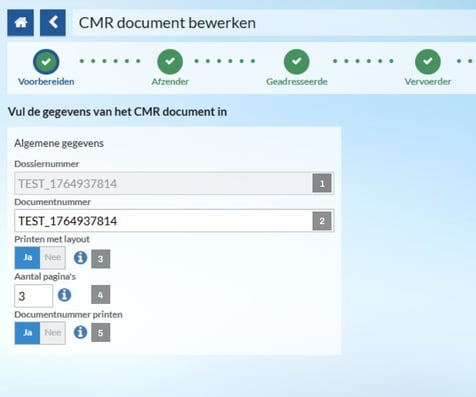
| Nr | JSON field | Type | Req. | On the CMR | Description |
| 1 | dossierNumber |
string(30) |
✓ | Dossier name in Shipment, for example your order, delivery or transport number. Use underscores, not hyphens. | |
| 2 | documentNumber |
string(20) |
Top of the form | The unique number printed on the CMR. If you leave it out, Shipment generates one. [VERIFY] | |
| 3 | displayLayout |
boolean |
Only with doPrintWhenValid. true: the PDF contains the full CMR form. false: only the text, for pre-printed forms. |
||
| 4 | numberOfPages |
integer |
Number of copies to print. | ||
| 5 | displayDocumentNumber |
boolean |
Print the document number on the form. |
Step 2: Afzender (Consignor)
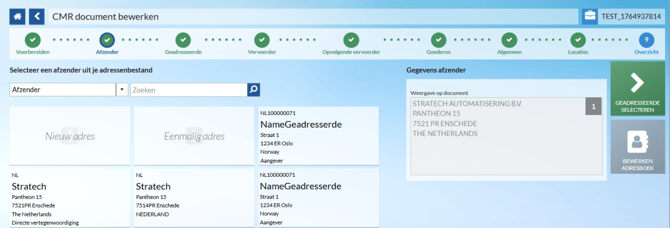
| Nr | JSON field | Type | Req. | On the CMR | Description |
| 1 | consignor.addressDescription |
string(305) |
Box 1 | Name and address of the consignor. Up to 6 lines of 50 characters, separated by \n. |
Step 3: Geadresseerde (Consignee)
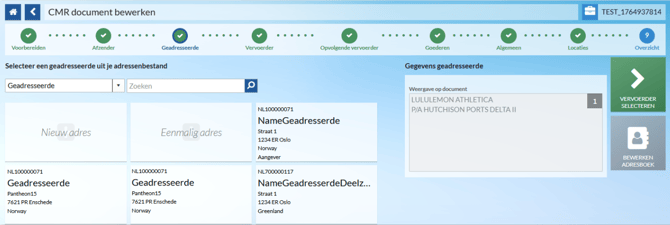
| Nr | JSON field | Type | Req. | On the CMR | Description |
| 1 | consignee.addressDescription |
string(305) |
Box 2 | Name and address of the consignee. Up to 6 lines of 50 characters, separated by \n. |
Step 4: Vervoerder (Carrier)
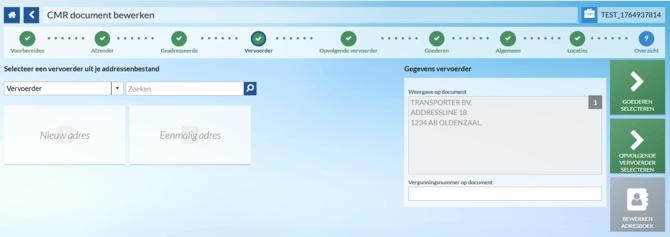
| Nr | JSON field | Type | Req. | On the CMR | Description |
| 1 | transporter.addressDescription |
string(305) |
Box 16 | Name and address of the carrier. Up to 6 lines of 50 characters, separated by \n. |
|
| – | transporter.authorisedTransporterAuthorisation |
string(6) |
Top right of the form | Authorisation number of the authorised carrier. [VERIFY: field in the screen] |
Step 5: Opvolgende vervoerder (Successive carrier)
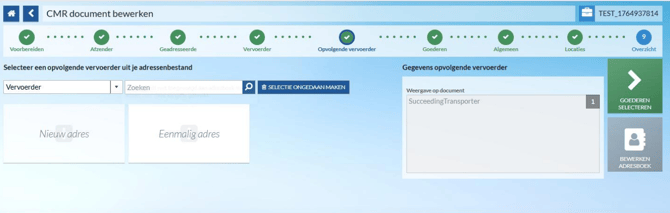
| Nr | JSON field | Type | Req. | On the CMR | Description |
| 1 | succeedingTransporter.addressDescription |
string(203) |
Box 17 | Name and address of the successive carrier, separated by \n. [VERIFY: 4 or 6 lines of 50; see the note below] |
Step 6: Goederen (Goods)
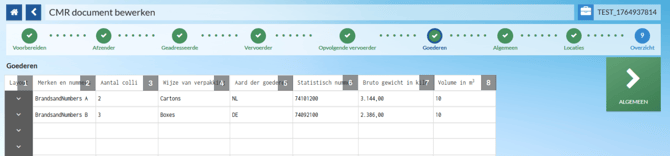
| Nr | JSON field | Type | Req. | On the CMR | Description |
| 1 | goodsItemRows[].rowNumber |
integer |
✓ | Row in the goods table, 0 to 15 (16 rows). Unique per row. | |
| 2 | goodsItemRows[].brandsAndNumbers.text |
string(100) |
Box 6 | Marks and numbers. | |
| 3 | goodsItemRows[].packagingQuantity.text |
string(100) |
Box 7 | Number of packages. Text, so you can write it as you like. | |
| 4 | goodsItemRows[].packagingType.text |
string(100) |
Box 8 | Method of packing, for example boxes, cartons or pallets. | |
| 5 | goodsItemRows[].origin.text |
string(100) |
Box 9 | Nature of the goods (Aard der goederen). | |
| 6 | goodsItemRows[].statisticalNumber.text |
string(100) |
Box 10 | Statistical number: commodity code (HS code). | |
| 7 | goodsItemRows[].brutoWeight.text |
string(100) |
Box 11 | Gross weight. Text, so you can add the unit. | |
| 8 | goodsItemRows[].volume.text |
string(100) |
Box 12 | Volume. Text, so you can add the unit. | |
goodsItemRows[].brandsAndNumbers.columnWidth |
integer |
✓ | Number of columns the cell spans. Every cell object (brandsAndNumbers up to volume) has a text and a columnWidth. |
Step 7: Algemeen (General)
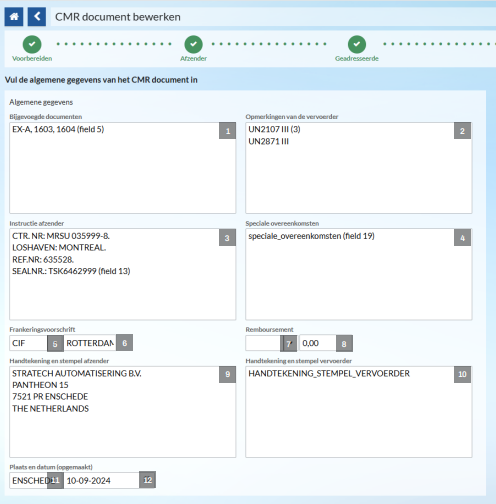
| Nr | JSON field | Type | Req. | On the CMR | Description |
| 1 | addedDocuments |
string(203) |
Box 5 | Documents attached, for example EX-A, invoice or packing list. Up to 4 lines of 50 characters. | |
| 2 | commentsConsignor |
string(407) |
Box 18 | Remarks of the carrier and consignor. Up to 8 lines of 50 characters. | |
| 3 | instructionsConsignor |
string(509) |
Box 13 | Instructions of the consignor. Up to 10 lines of 50 characters. | |
| 4 | specialAgreements |
string(407) |
Box 19 | Special agreements. Up to 8 lines of 50 characters. | |
| 5 | incoTermsCode |
string(3) |
Part of box 14 | Incoterm, for example CIF, CFR, DAP or EXW. | |
| 6 | incoTermsLocation |
string(35) |
Part of box 14 | Place that belongs to the Incoterm. | |
| 7 | refund.currency |
string(3) |
Box 15 | Currency of the cash on delivery amount (3 letters, for example EUR or USD). | |
| 8 | refund.amount |
decimal |
Box 15 | Cash on delivery amount in that currency. | |
| 9 | signatureConsignor |
string(197) |
Box 22 | Signature and stamp of the consignor. Up to 6 lines of 32 characters. | |
| 10 | signatureConsignee |
string(197) |
Box 23 | Signature and stamp of the consignee. Up to 6 lines of 32 characters. | |
| 11 | signingLocation |
string(30) |
Part of box 21 | Place where the CMR is made out. | |
| 12 | signingDate |
datetime |
Part of box 21 | Date on which the CMR is made out. |
Step 8: Locaties (Locations)
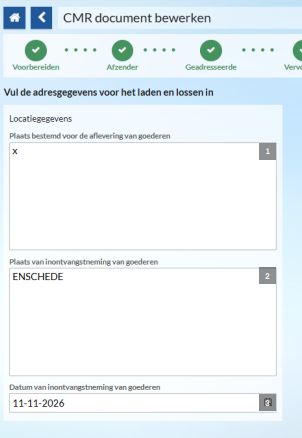
| Nr | JSON field | Type | Req. | On the CMR | Description |
| 1 | locationOfDeliveryOfGoods |
string(203) |
Box 3 | Place of delivery. Up to 4 lines of 50 characters. | |
| 2 | locationOfTakingOverGoods |
string(203) |
Box 4 | Place where the goods are taken over. Up to 4 lines of 50 characters. | |
| 3 | dateOfTakingOverGoods |
datetime |
Box 4 | Date on which the goods are taken over. |
Goods table: columns
The goods table on the CMR has 7 columns (boxes 6 to 12). Each cell is an object with text and columnWidth. A cell can span several columns; the total per row may not exceed 7. Give a cell that is covered by a wider cell "columnWidth": 0.
"brandsAndNumbers": { "text": "PAL 1-4", "columnWidth": 1 },
"packagingQuantity": { "text": "4", "columnWidth": 1 }
Multi-line text
Fields with a line limit accept line breaks. Separate the lines with \n:
"locationOfDeliveryOfGoods": "Warehouse 3\nHarbour Road 12\n3011 AB Rotterdam"
Check: for
succeedingTransporter.addressDescription, the specification says 6 lines of 50, but the maximum length (203) allows 4 lines. [VERIFY]
Response
| Field | Description |
applicationReferenceId |
The reference you sent. |
id |
ID of the CMR in Shipment. |
declarationType |
9. |
isSaved |
Whether the CMR was saved. |
isPrinted |
Whether the PDF was generated. |
errors |
Validation errors. Empty if the CMR is valid. |
documentId |
ID of the generated PDF. Use it to download the PDF. |
documentNumber |
The document number you sent, or the one Shipment generated. |
importFileNames |
Names of files that belong to the CMR. Upload them separately, after the CMR is saved. |
Upload files
POST /erpservices/Documents/UploadFile?applicationReferenceId=…
If the response lists importFileNames, upload each file as a multipart form with the applicationReferenceId of the CMR. Files can only be uploaded after the CMR is saved. [TO DO: example request]
Download the PDF
Optional, requires the right modules.
GET {base-url}/erpservices/Documents?id={documentId}
Authorization: Bearer <access_token>
Replace {base-url} with the URL of your product and environment:
| Product and environment | {base-url} |
| Stratech Shipment – Test | https://test-{prefix}.shipment-stratech.nl |
| Stratech Shipment – Production | https://{prefix}.stratechshipment.nl |
| Beurtvaartadres ShipmentManager – Test | https://{prefix}.accshipmentmanager.eu |
| Beurtvaartadres ShipmentManager – Production | https://{prefix}.shipmentmanager.eu |
HTTP 204 means no document was found for that ID. Shipment can also notify you when a document is ready. See the article Status updates.