A DMS Export declaration goes through several steps at Customs. For each step Shipment sends a status update to your platform. This article shows which updates you can expect, in which order, and which ones matter for your process. The fields of a status update are in the article Status updates; all values are in the article Status list.
How it works
- Your platform sends the declaration data to Shipment.
- Shipment sends the declaration to Customs. For every status Customs gives, Shipment sends a status update to your platform.
- When Customs issues a document, such as the export document, Shipment sends a document update. Your platform downloads the PDF with the
DocumentId.
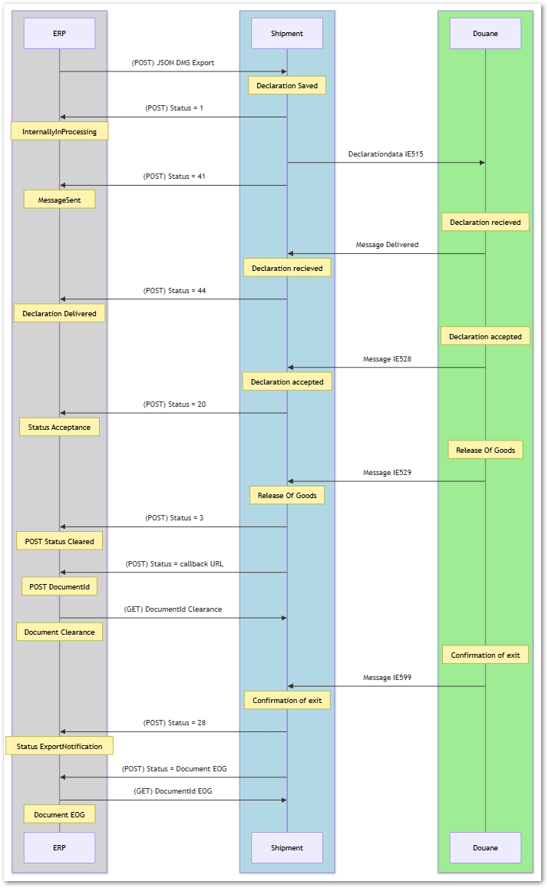
Normal flow
| Step | What happens | Status update | What you do |
| 1 | You send the declaration. The response contains isSaved, isSubmitted and the frn. |
– | Store the frn with the declaration. |
| 2 | DMS has technically accepted the declaration and checks it. | 20 Acceptance |
None. |
| 3 | Customs releases the goods for export. The update contains the MRN. | 3 Cleared |
Store the MRN. The goods can go. |
| 4 | Shipment has generated the export document. | Document update, documentContentType Original |
Optional: download the PDF. |
| 5 | The goods have left the EU. Customs confirms the exit. | 28 ExportNotification |
Optional: close the shipment. The export is completed. |
Example of the status update in step 3:
{
  "ApplicationReferenceId": "Test_1790935911",
  "DossierNumber": "Test_1790935911",
  "Status": 3,
  "SubmissionType": 8,
  "DeclarationType": 2,
  "Frn": "261002-1004556",
  "Mrn": "26NL100210115472E5",
  "StatusChangeTime": "2026-10-02T10:11:58+00:00"
}
Status 3 is Cleared, submission type 8 is the export declaration (IE515) and declaration type 2 is DMS Export.
Variants
Customs can select the declaration for a check, ask for information or reject it. You then receive other updates. The scenario numbers refer to the article Test scenarios, where you can simulate each flow.
| Situation | Status updates, in order | What you do | Scenario |
| Physical inspection, Customs asks for documents | 20 Acceptance, 25 ControlNotificationPhysicalControl, 29 ReminderProvidingAdditionalDocuments | Send the requested documents to Customs. | 14 |
| Physical inspection with provisional release | 20 Acceptance, 25 ControlNotificationPhysicalControl, 4 ReleaseOfGoods, 3 Cleared | Wait until the inspection is completed. Store the MRN. | 15 |
| Request for information (RFI) after an inspection | 20 Acceptance, 25 ControlNotificationPhysicalControl, 33 RequestForInformation, then 35 Received, 30 Amendments, 3 Cleared | Answer the RFI with a CRE message from Shipment. | 16, 17 |
| No confirmation of exit | 20 Acceptance, 3 Cleared, 27 AlternativeEvidenceRequested, then 35 Received, 28 ExportNotification | Send alternative proof that the goods have left the EU. | 19, 20 |
| Functional rejection | 23 FunctionalRejection | Correct the declaration and send it again with a new applicationReferenceId. |
21 |
Which updates to act on
You receive many updates during the life of a declaration. Most are informative. We recommend storing all updates for monitoring, but triggering actions in your platform only for the updates that matter for your process. For DMS Export these are usually:
3Cleared: the goods are released for export. Store the MRN.28ExportNotification: the exit is confirmed and the export is completed.23,25,27,29and33: Customs needs an action. Show a warning to the user.
Other message types
For other message types these updates are usually the most relevant:
| Message type | Relevant status updates |
| DMS Import | 4 ReleaseOfGoods, 37 PreliminaryTax, 36 FinalTax, 3 Cleared |
| Transit (NCTS) | 65 GoodsReleasedForTransit, 79 GoodsPartialReleased, 66 GoodsNotReleasedForTransit, 48 ArrivalNotification, 74 UnloadingPermission, 77 Discrepancies |
| Excise (EMCS) | 86 EadEsad, 93 ChangeOfDestination, 92 CancellationOfEad, 94 ReportOfReceiptAcceptedAndSatisfactory, 96 ReportOfReceiptRefused, 104 NotificationOfAcceptedExportRelease |
| Portbase MED and MID | 129 TechnicalAcceptance, 128 StatusNotification |
| Single Window provisioning | 116 Accepted, 7 NotAccepted |