By using the payload exported from an existing Shipment declaration, you can quickly build new API requests without manually reconstructing the complete declarationData structure.
This significantly reduces implementation time and helps ensure that the JSON structure matches the format expected by Shipment's API.
This functionality can be used with an existing declaration or document stored in Shipment.
By exporting the payload from Shipment, the declaration data can be reused almost directly in a JSON dataset for a POST request.
The exported payload data can replace the existing declarationData section in your JSON request. In most cases, the content can be copied nearly one-to-one from the exported payload.
The JSON structure above the declarationData node remains dependent on the declaration type or document type being created. Therefore, only the content within declarationData should be considered interchangeable between payload exports and API requests.
Example Structure
{
"DossierNumber": "Test_1",
"dmsExportDeclarations": [
{
"ApplicationReferenceId": "Test_1",
"doSubmitWhenValid": false,
"doNotSaveWhenInvalid": true,
"consignor": {
"internalCode": "internalCode"
},
"consignee": {
"address": {
"name": "DRILLING LTD.",
"city": "CAIRO",
"streetAndNumber": "No 1 Abdel Khalek",
"zipCode": "1111",
"country": {
"code": "EG",
"name": "Egypt"
}
},
"eoriNumber": null,
"internalCode": null
},
"declarationData": {
// Replace this entire section
// with the exported payload data
}
}
]
}
Obtaining the Declaration Data from Shipment
The declaration data can be extracted directly from Shipment using the browser developer tools.
Prerequisites
• Microsoft Edge or Google Chrome
• Notepad++
• JSON Tools plugin for Notepad++
Steps
-
Open Shipment.
-
Open the browser Developer Tools by pressing F12.
-
Navigate to the Network tab.
-
In Chrome, select Network from the top menu.
-
In Edge, select Network from the left navigation panel.
-
-
Open the required declaration or document in Shipment.
-
Modify a value (for example weight, description, or another field) and save the record.
-
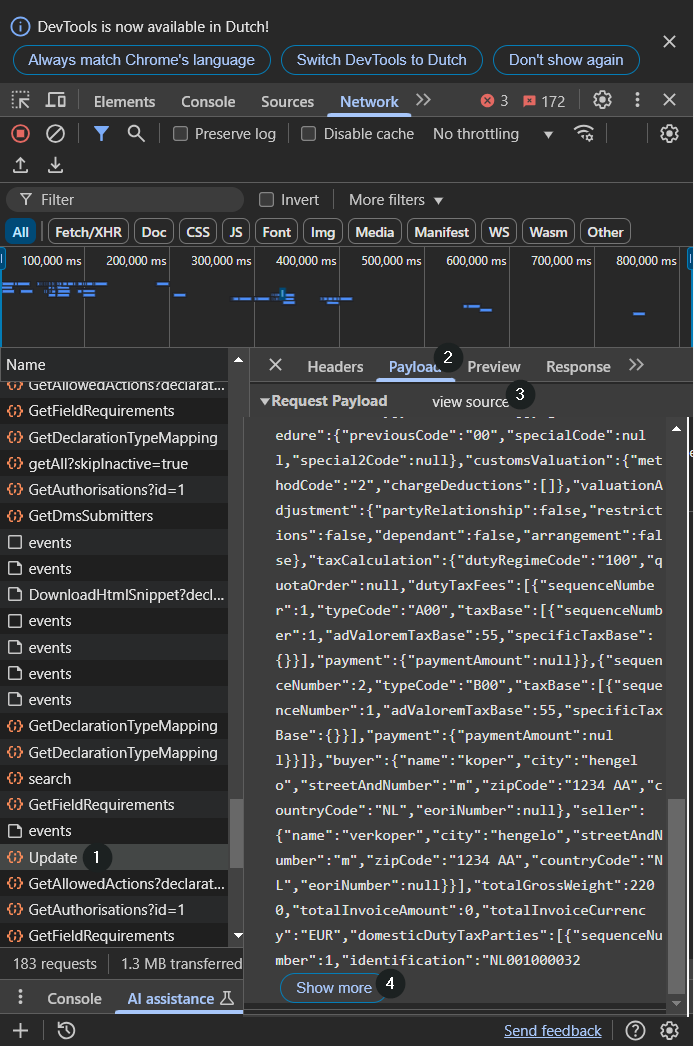
Locate the Update request in the network traffic list (1).
-
Open the request and view the Payload section (2).
-
Click on "View Source" (3)
-
Expand the payload and display the complete contents (4).
-
Copy the entire payload.
- Paste the content into something like Notepad++.
- Use a JSON tooling/plugin like "JSON Tools" plugin and select Pretty Print to format the JSON for easier reading.
- The formatted JSON can now be analyzed, reused, or copied into the declarationData section of an API request.
Important Notes
-
This method can be used for declarations, documents, and most Shipment dossier types.
-
The exported payload represents the data currently stored in Shipment.
-
Only the declarationData section should be copied into the corresponding location of the API request.
-
The surrounding JSON structure may vary depending on the declaration type, document type, or API endpoint being used.
-
Review all references, identifiers, and business-specific values before submitting the request to the API.